Blog
How to Read Your TNB Electricity Bill (Line by Line)
A TNB commercial bill isn't one number, it's seven separate charges, and some you can cut while others you can't touch. Here's how to read each line and find the leverage.
 Tan Kok XinTNB Bills & Tariffs
Read your TNB electricity bill by checking what each charge is based on: energy used, maximum demand, a fixed fee or an adjustment. For medium-voltage commercial and industrial accounts under RP4, the Tenaga Nasional Berhad (TNB) tariff structure in force since 1 July 2025, these appear as separate components.
For example, the Capacity and Network Charges together run to roughly RM89 to RM97 per kilowatt of maximum demand per month on common medium-voltage tariffs. Reducing that peak can lower the bill even if total energy use stays the same.
In short
- Read your bill by matching each line to what it charges for: energy (kWh), maximum demand (kW), a fixed retail fee, or the AFA adjustment.
- Under RP4, medium-voltage accounts pay Capacity and Network charges separately, together running about RM89 to RM97 per kW.
- Only some lines are within your control; maximum demand and power factor are the ones worth watching closely, not the fixed charges.
- Watching demand build during the month lets you act before the charge is set, not after the bill arrives.
The lines on a post-RP4 TNB electricity bill
A medium-voltage commercial or industrial bill groups its charges into the seven parts below. Each uses a different basis, so check the quantities and rates as well as the total.
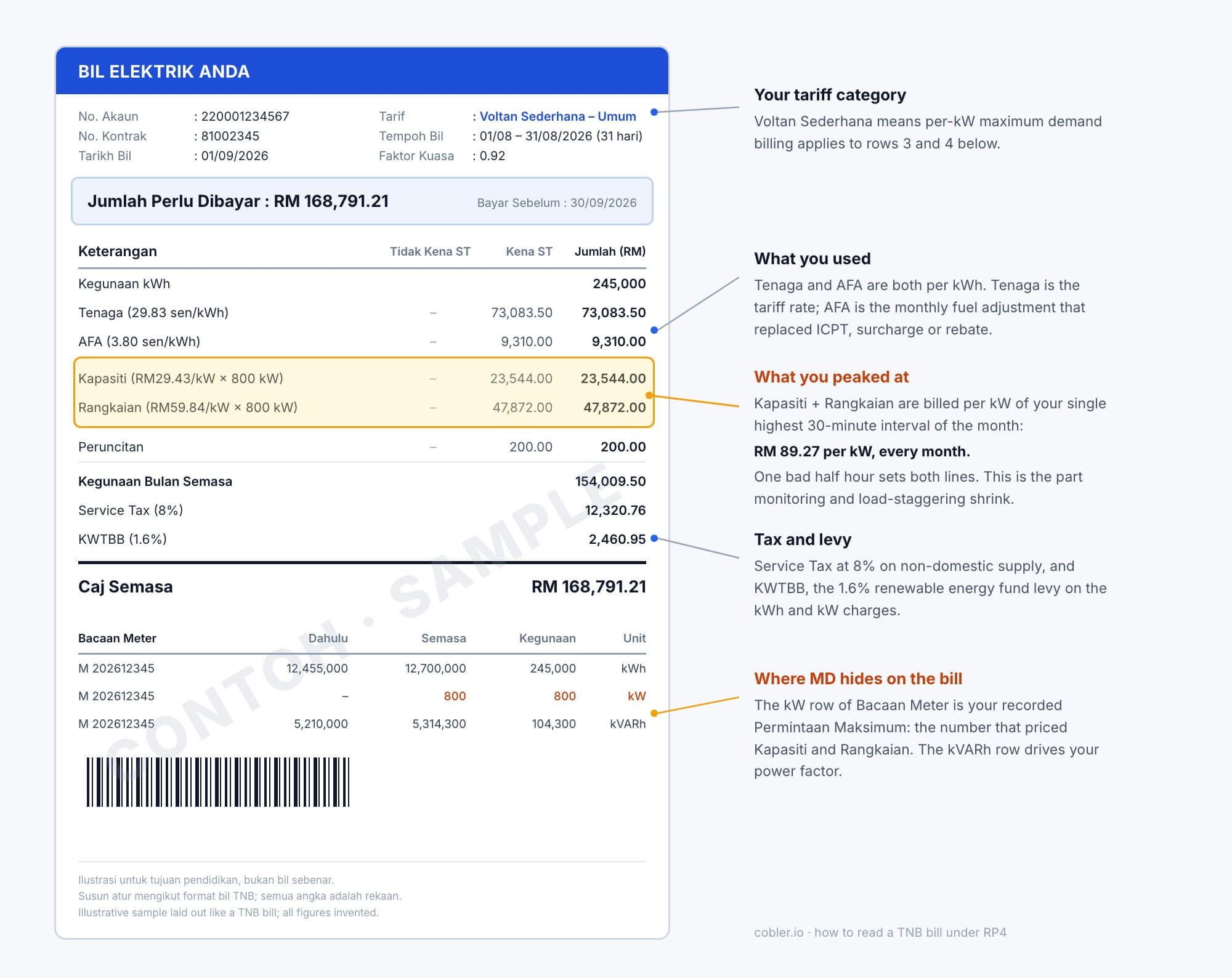
A sample laid out like a real TNB Medium Voltage bill (illustrative figures). Kapasiti and Rangkaian, highlighted, are priced by the kW row of the meter readings: your recorded Permintaan Maksimum.
1. Energy Charge (sen/kWh): the electricity you used
The Energy Charge is your total consumption in kilowatt-hours (kWh) multiplied by the rate in sen per kWh. It is usually the largest single line on the bill.
On a Time-of-Use tariff, consumption is split into peak and off-peak periods, with different rates. Under RP4, the peak window is 2:00pm to 10:00pm on weekdays; everything else, including all weekend, is off-peak. You can reduce this charge by using fewer kWh or moving consumption that can wait into the cheaper off-peak period.
2. Capacity Charge and Network Charge (RM/kW): your monthly peak
The Capacity and Network Charges are based on your highest maximum demand in the month, measured in kilowatts (kW). This is the highest half-hour average power drawn, so loads running together during that period affect the charge. The Capacity Charge pays for generation capacity held ready for your peak, while the Network Charge pays for the grid capacity needed to deliver it.
These charges are often among the largest costs you can control. Reducing maximum demand is usually where the biggest quick savings are available. See the maximum demand charge explained and how to cut it for the calculation and practical steps.
Small low-voltage users do not have a separate demand line. Their capacity and network costs are charged per kWh instead.
3. Retail Charge (RM/month): the fixed account fee
The Retail Charge is a small, flat monthly account fee. Changing how the building operates does not reduce it.
4. Automatic Fuel Adjustment (AFA): a monthly surcharge or rebate
The Automatic Fuel Adjustment (AFA) adjusts the bill for the actual cost of fuel and the ringgit's exchange rate. It replaced the Imbalance Cost Pass-Through (ICPT) mechanism and changes every month, so this line can vary even when your consumption stays the same.
When global fuel is expensive, it is a surcharge; when fuel is cheap, it is a rebate. You cannot control the adjustment rate. See the AFA explained for more detail.
5. Power Factor surcharge: a penalty you can avoid
TNB adds a surcharge if your site's power factor falls below the required threshold, which is 0.85 on most medium-voltage supplies. Power factor describes how effectively the electrical supply is used to do useful work. Inductive loads, such as lightly loaded motors, can lower it.
The surcharge is almost entirely avoidable through power factor correction. If it appears on your bill, check the cause and the correction needed. See the power factor surcharge.
6. The KWTBB levy: funding renewable energy
Kumpulan Wang Tenaga Boleh Baharu (KWTBB), Malaysia's Renewable Energy Fund, is funded through a levy of 1.6% of the bill on non-domestic accounts. It supports renewable energy development through the Feed-in Tariff.
Since August 2025, the levy has been waived for customers on certified green energy programmes. Otherwise, you can mostly reduce the amount by using less overall, or remove it by switching to a green tariff. See what KWTBB is, how the 1.6% is calculated, and who can stop paying it.
7. Taxes: check what applies to your account
Applicable taxes, such as Sales and Service Tax (SST), may appear depending on your tariff and usage. Like the levy, they scale with the relevant bill charges; they are not a separate operating cost you can target directly.
Focus on the charges your operation can reduce
You can directly reduce energy charges, demand charges and the power factor surcharge by changing how the site operates. For most sites, energy and demand charges offer the largest savings.
Bill component | What you can change |
|---|---|
Energy Charge | Use less electricity and move consumption off-peak on a Time-of-Use tariff. |
Capacity and Network Charges | Reduce maximum demand. |
Power Factor surcharge | Correct power factor to reduce or eliminate the surcharge. |
AFA, KWTBB levy and taxes | You cannot change the rates through site operation. Lower usage can reduce the amounts; KWTBB may also be waived through a qualifying green programme. |
Retail Charge | The monthly fee is fixed. |
Monitor during the month to act before charges are set
The bill shows what happened after the billing month has ended. By then, the peak that set your demand charge has passed, consumption that could have run off-peak has already been used, and any power factor surcharge has been incurred.
Continuous monitoring lets operators see consumption, demand and power factor while they can still act. Your own metering helps with this, even though it never exactly matches the TNB meter.
CobiNeural shows demand as the peak builds, power factor as it falls and consumption as it rises. Operators can use these readings to manage costs during the month. The same data supports an energy management system and reporting under the Energy Efficiency and Conservation Act (EECA).
To see your own bill broken down and its charges forming in real time, book a CobiNeural walkthrough.
Sources
If you want to see this on your own bill, our free maximum demand calculator estimates the charge from your kW and tariff. For the full mechanics of a TNB bill, see our free course Understanding Your Electricity Bill.
FAQ
Frequently asked questions
Ask us about this topic
Something in this article you want to dig into — or a situation in your own building it doesn't quite cover? Send us your question. We don't run public comments; the team replies to you directly by email.