Blog
Bits and Bytes
A light switch is one bit. Eight of them make a byte, which counts from 0 to 255, and with bytes a computer stores everything: the letter A is 65, a pixel is three bytes, and a minute of CCTV is 15 MB. Part 1 of How a Computer Works.
 Tan Kok XinHow a Computer Works
Part 1 of 13 in Cobler's How a Computer Works course. New here? Start with the course map.
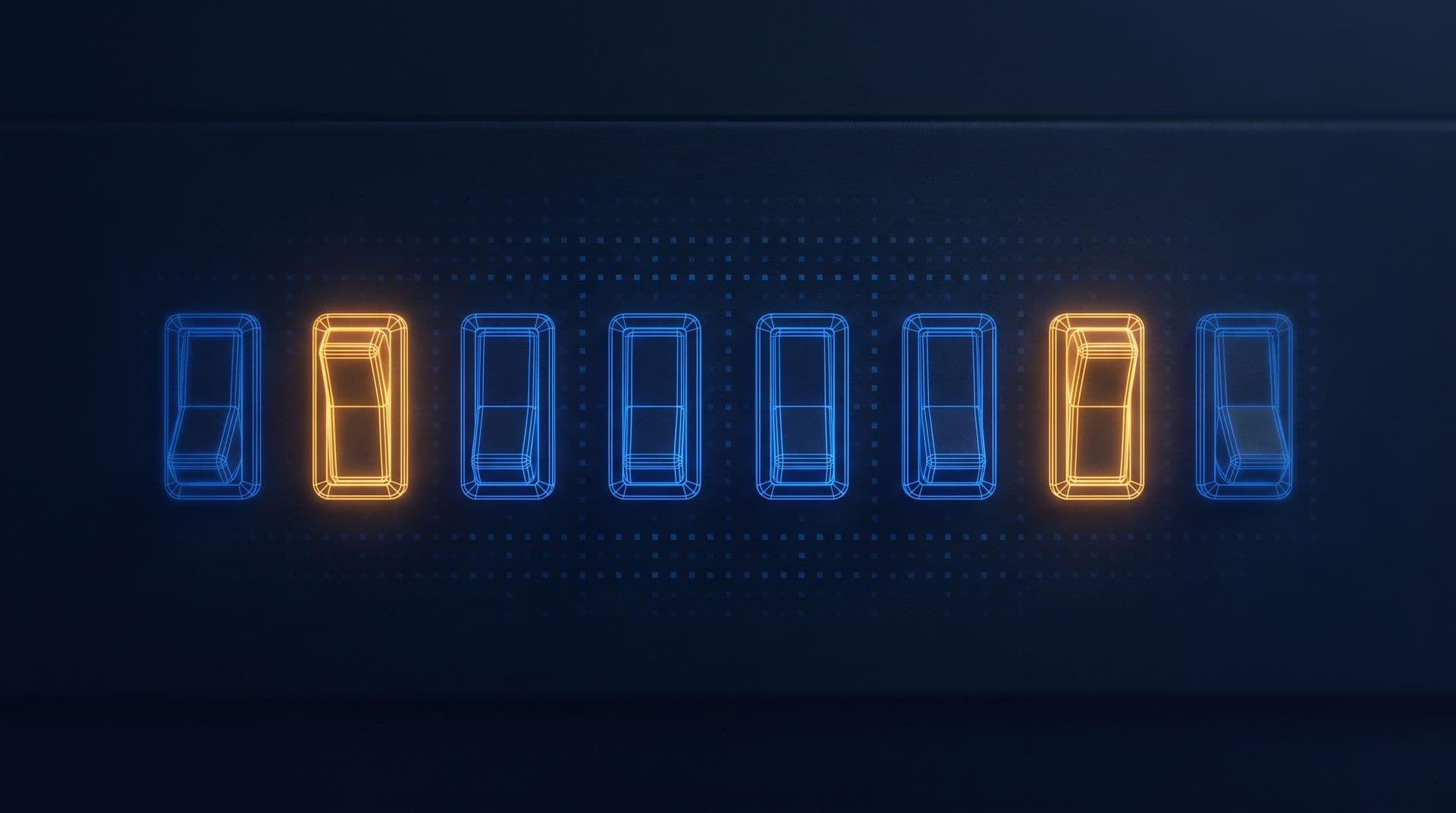
Imagine a light switch on the wall. It can only be in one of two positions. Flick it up and the light's on, flick it down and it's off, and there's nothing in between.
So even a plain switch is holding a little piece of information. It answers one yes-or-no question, "is the light on?", and it keeps answering until somebody flips it. That's really where bits and bytes start, and everything a computer stores, from this sentence to a video, is built out of answers like that one.
Now, in the course map we watched a facility manager tap a 2 a.m. alert about a pump called CWP-2, and a chart and a video came up on their laptop. Inside that laptop there's nothing but switches like this one, billions of them, each far too small to see. So how can a row of on-off switches hold a letter, a colour or a pump's reading? Let's build it up from one switch.
One switch, one bit
Let's give our switch a job. Say it's wired to show whether a pump is running, so on means running and off means stopped. One switch can tell us that much and nothing more. It can't say how hard the pump is working, or since when.
Computers write on as 1 and off as 0, so let's do the same. A single switch holding a 1 or a 0 is the smallest piece of information there is, and it's so small that we call it just that, a bit. The word is short for binary digit, and binary means "made of two".
Counting with switches
So one switch gives us two answers. What if we put two switches side by side? Well, now there are four patterns, off-off, off-on, on-off and on-on, which we write 00, 01, 10 and 11. Add a third switch, and each of those four patterns can have the new switch off or on, so we get eight. Every switch we add doubles the number of patterns, and eight switches give us 2 × 2 × 2 × 2 × 2 × 2 × 2 × 2 = 256.
A pattern is only useful once we agree what it means, and the most useful thing to agree is that each pattern is a number. So how do we count with switches? Think about the odometer in an old car, the row of little wheels that counts kilometres. Each wheel goes 0, 1, 2 and so on up to 9. When it passes 9 it rolls back to 0 and nudges the wheel on its left up by one.
Now imagine an odometer whose wheels only have two faces, 0 and 1. It counts 0, then 1, and then the right-hand wheel is already at its top, so it rolls back to 0 and nudges the next wheel up. That gives 10. Then comes 11, then both wheels roll over and we get 100. That's counting in binary.
In the counting we do every day, each wheel is worth ten times the one to its right, so we have ones, tens and hundreds. In binary, each wheel is worth twice the one to its right. So in a row of eight, the switches are worth 128, 64, 32, 16, 8, 4, 2 and 1, and to read a pattern we just add up the ones that are on. Let's take 0100 0001 (we write eight switches in two groups of four, so they're easier to read):
$$0100\,0001 = 64 + 1 = 65$$
All eight off is 0. All eight on is 128 + 64 + 32 + 16 + 8 + 4 + 2 + 1 = 255. So a row of eight switches can hold any whole number from 0 to 255, and those are our 256 patterns.
Bits and bytes
A row of eight bits like this is what we call a byte. The eight-bit byte became the standard in the 1960s, and it's been the basic unit for measuring computer memory and files ever since. So when something is one byte long, it's one row of eight switches, holding a number somewhere from 0 to 255.
Bigger numbers just need longer rows. Two bytes, 16 switches, count up to 65,535, and four bytes count past four billion.
Everything is a number
Now, you'd expect a computer to store numbers as numbers. What's less obvious is that it stores everything else as numbers too.
Letters. When you type a capital A, the computer stores 65, the 0100 0001 we just read. That comes from a code called ASCII (the American Standard Code for Information Interchange), first published in 1963 so that different machines would use the same number for the same letter. B is 66, C is 67, and so on. Lowercase a is 97, which is 0110 0001, so it's only one switch different from A, the one worth 32. Unicode, the code that covers every language today, keeps these same numbers for its first 128 characters.
Colours. Each dot on a screen, which we call a pixel, is really three tiny lights side by side, one red, one green and one blue. One byte sets how bright each light is, from 0 for off to 255 for full, so a pixel is three bytes. The amber this course uses for highlights is red 245, green 158 and blue 11. That's a lot of red, some green and hardly any blue, which our eyes see as a warm orange-yellow. And three bytes give 256 × 256 × 256 = 16,777,216 different colours.
Sound. A microphone turns sound into a voltage that wobbles up and down. To store it, the computer measures that voltage thousands of times a second and keeps each measurement as a number, which we call a sample. Music on a CD was measured 44,100 times a second, with each sample a two-byte number, for each of the left and right speakers. So a sound is basically a long list of numbers.
Readings. If you've read the Electricity course, you've already seen one of these. In Electricity Part 20, a carbon dioxide (CO2) sensor in a level 9 meeting room read 1,000 parts per million (ppm). The controller turned that into a count of 2,458, which sat in 12 switches as 1001 1001 1010. That's the same idea with a longer row, twelve switches worth 2,048 down to 1.
Now, notice something kind of odd. A byte doesn't know what it is. The pattern 0100 0001 is the number 65, and it's also the letter A, a red light at about a quarter of full brightness, or one sample of a sound. Which one it means depends entirely on the program reading it. Hold on to that, because in Part 5 the same 65 turns out to be an instruction too.
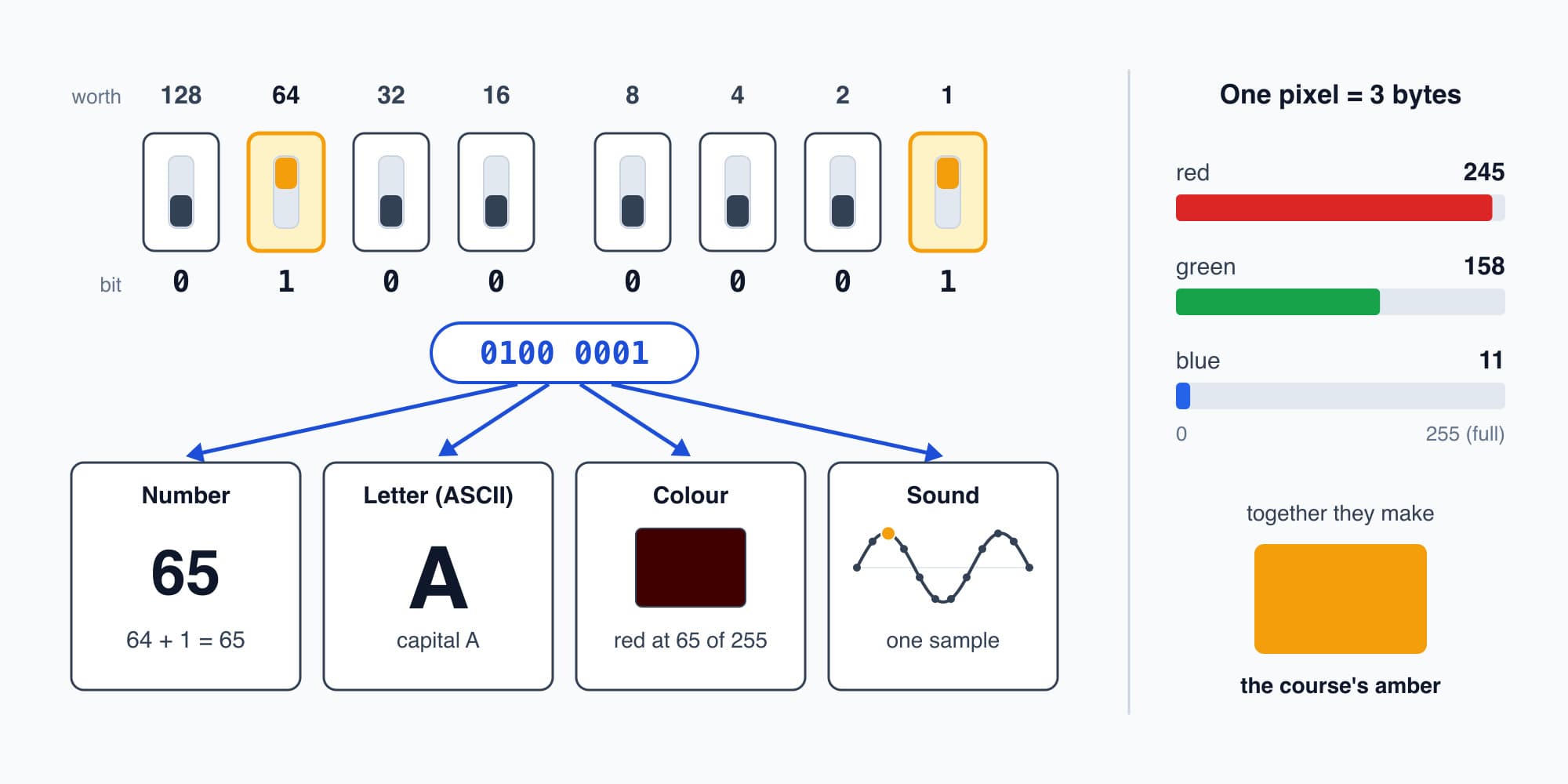
The same eight switches, 0100 0001, can be read as a number, a letter, a colour or a sound, and the program reading them decides which.
Try it. The course's amber is red 245, green 158 and blue 11. Write the red byte, 245, as eight switches. And which letter is 0100 0011?
Show the worked answer
Let's take the biggest switch values that fit. 245 is 128 + 64 + 32 + 16 + 4 + 1, so the switches worth 128, 64, 32, 16, 4 and 1 are on, and the ones worth 8 and 2 are off. That's 1111 0101.
For the letter, 0100 0011 is 64 + 2 + 1 = 67, which is C.
Kilo, mega, giga
One byte holds one letter, so anything real takes a lot of them, and we group them with the same prefixes we use for metres and watts. A kilobyte (KB) is a thousand bytes, a megabyte (MB) is a million, and a gigabyte (GB) is a billion.
There's one wrinkle. Memory chips are built in powers of two (Part 4 shows why), so for a laptop's memory a gigabyte means \(2^{30}\) bytes, which is 2 multiplied by itself 30 times. That's 1,073,741,824, about 7% more than a billion. For files and downloads people usually mean the round numbers, and for working things out in this course the difference rarely matters.
The other wrinkle is bits against bytes. Network speeds are usually counted in bits per second, with a small b, and file sizes in bytes, with a big B. Since a byte is eight bits, an office line of 100 megabits a second (illustrative) moves at most 12.5 megabytes of file each second.
File sizes
So let's count switches for a few real things. A text message of 160 letters, at one byte a letter, is 160 bytes, or 1,280 switches.
A photo from a 12-megapixel phone camera has 12 million pixels, and at three bytes each that's 36 MB. But the photo file on the phone is usually only a few megabytes, because the phone squeezes it before saving. It keeps the picture and drops detail our eyes won't miss.
And then there's one minute of the CCTV clip from our plant room. The camera streams about 2 megabits a second (illustrative), so over a minute that's
$$2 \ \text{megabits per second} \times 60 \ \text{s} = 120 \ \text{megabits} = \frac{120}{8} \ \text{MB} = 15 \ \text{MB}$$
So a minute of video is 15 MB, which is 120 million switches. That's for 1,800 pictures (30 frames a second for 60 seconds), and yet it's less than half of our one photo before squeezing. So the video is being squeezed far harder than the photo, and how it gets away with that is the story of Part 11.
Here's the whole lot side by side, smallest first:
What | Bytes | Switches (bits) |
|---|---|---|
The letter A | 1 | 8 |
One pixel | 3 | 24 |
A 160-letter text message | 160 | 1,280 |
One minute of the CCTV clip | 15 million (15 MB) | 120 million |
A 12-megapixel photo, before squeezing | 36 million (36 MB) | 288 million |
A laptop with 16 GB of memory | about 17 billion | about 137 billion |
The 2 a.m. alert
So let's go back to the laptop at 8:05 a.m. and look at the alert the facility manager tapped. On the screen it says something like "CWP-2 drawing 27 kW, all chillers off" (illustrative wording). Underneath, every piece of that is bytes. The letters C, W and P are the numbers 67, 87 and 80. The reading 27 fits in a single byte as 0001 1011. The time, the building, the pump's name and the readings around it all get the same treatment, and with everything the app sends along with it, the whole alert comes to something like a few thousand bytes (illustrative). So on its way to the laptop, the alert was a few tens of thousands of switches, each set on or off in the right order.
Even that 27 started out as a pattern of switches. A power meter on the pump's supply measured it and held it as a number, and every step since has copied that number from one row of switches to another. Part 13 follows it all the way back to the meter.
Try it. The plant room camera streams about 2 megabits a second (illustrative). How many megabytes are the 10 minutes of footage from 2 a.m., and how many switches would hold them?
Show the worked answer
Ten minutes is 600 seconds, so the camera sends 2 × 600 = 1,200 megabits. Dividing by 8 gives 150 MB. And 1,200 megabits is 1,200 million bits, so that's 1.2 billion switches. It sounds like a lot, but it would fit in under 1% of a 16 GB laptop's memory.
Numbers that sit still
So now we can hold any number we like, and a number can stand for a letter, a colour, a sound or a pump's power. But every one of our switches was flipped by a hand, and once it's set, it just sits there. A row of switches holding 27 can't add anything to it, and it certainly can't notice that the chillers are off and decide that's worth an alert. To compute anything at all, switches have to be able to flip other switches, with no hand involved. So how can one switch flip another? That's Part 2: Logic Gates.
This is Part 1 of 13 in Cobler's How a Computer Works course. Next: Logic Gates.
Cobler builds CobiNeural, which turns a building's meter and sensor readings into live numbers and alerts like the one in this part, so to see your own building's numbers, talk to us.
FAQ
Frequently asked questions
Ask us about this topic
Something in this article you want to dig into — or a situation in your own building it doesn't quite cover? Send us your question. We don't run public comments; the team replies to you directly by email.