
Blog
BMS Scheduling and Optimum Start: How a Building Wakes Itself Up
How a BMS uses time schedules, occupancy sensing and optimum start to pre-cool a building in time and stop cooling empty rooms — free savings in the tropics.
 Tan Kok XinBuilding Automation & BMS Fundamentals
Part 7 of 16 in Cobler's Building Automation and BMS Fundamentals course. New here? See the course page.
In Part 6, AHU-12A's sequence began with "when the schedule changes to occupied", and the section on modes left two questions open: how far can the cooling relax when the floor is empty, and how does the BMS decide when to start pre-cooling? This part answers both. It explains the scheduling logic in the building management system (BMS): how the BMS knows the working hours, what it does at night, and how optimum start picks the moment to begin cooling.
You see the result when you arrive at 8am and level 12 east is already cool, although nobody was there at 7am to switch anything on.
A time schedule tells each zone its working hours
The simplest layer is a time schedule: a calendar in the BMS that says, for each zone, when it is occupied (hold the comfort setpoint) and when it is unoccupied (relax). The office tower works 8am to 6pm, Monday to Friday, so level 12 east has an occupied period covering those hours. (The section on optimum start explains how early before 8am the cooling actually starts.)
Schedules are set per zone, because different parts of a building keep different hours. In our tower, a few tenants work on Saturday mornings, so their floors need a Saturday schedule that the other floors do not. The ground-floor lobby and café, which are cooled by fan coil units (FCUs), keep their own hours too.
Two extra calendars sit on top of the weekly schedule:
- A weekend calendar, so Saturdays and Sundays have reduced or no occupied hours.
- A public holiday calendar, so the plant does not start on Hari Raya, Deepavali, Chinese New Year or National Day when the building is empty. Malaysia has many public holidays, and forgetting this one calendar can mean cooling an empty tower on a dozen or more full days a year.
Once a schedule is set up, the BMS follows it automatically. Someone has to update the holiday list once a year, and the building then stops cooling empty floors without anyone touching a switch.
In the tropics, scheduling is the cheapest saving
In a temperate country, buildings have months when they need little cooling or heating. Malaysia has no such season: every day is a cooling day. A building without a schedule does not waste a little energy at the edges. It runs its chillers, pumps and fans against the heat all day and all night, all year.
That is why scheduling is often called "free savings". It does not make the plant more efficient. It stops the plant running when there is no reason to run. Every hour of avoided run time is energy you do not buy and wear you do not put on the machines, and it needs no new hardware, only better instructions.
At night, the setpoint drifts up instead of switching off
Switching the cooling fully off overnight sounds like the biggest saving, but in our climate it has a cost. A building left with no cooling for twelve hot, humid hours becomes warm and damp inside. Moisture from the outside air soaks into the building, and pulling it back to comfort the next morning takes a large, expensive burst of cooling.
So many buildings use unoccupied setback. During occupied hours, the zone setpoint on level 12 east is 24 °C, inside the 23 to 26 °C comfort range from Part 2. During unoccupied hours, the BMS raises it to 27 to 28 °C. The cooling does not stop completely. It only runs if the floor gets warmer than that. For AHU-12A, the rule might be: if a zone on level 12 east rises above 28 °C at night, start the AHU and cool until the zone is back down to 27 °C. The gap between 28 °C and 27 °C is a deadband, as in Part 4, and it stops the fan being switched on and off every few minutes. This keeps heat and humidity in check without paying to hold 24 °C in empty rooms. (In Malaysia the setpoint moves up at night, not down; the box near the end of this part explains the name.)
Optimum start begins cooling as late as it safely can
The floor has to reach 24 °C by 8am. A fixed schedule might say "start cooling at 7:00 every day". That time is a guess, chosen to be early enough on the hottest morning. On most mornings the building needs less time, and every extra minute of cooling an empty floor costs money.
Optimum start replaces the fixed time with a calculation based on how this building actually behaves. Over days and weeks, the BMS records how long the floor takes to cool from its overnight temperature to the setpoint. For example, "yesterday it took 55 minutes to go from 28 °C down to 24 °C." Each morning it looks at how warm the zones are now, and often at the outside conditions, and works backwards from 8am:
- On a hot, humid morning, the floor is warmer and slower to cool, so the BMS starts earlier, perhaps at 7:10.
- On a cool, rainy morning, the floor barely warmed overnight, so it starts later, perhaps at 7:40.
After each morning, the BMS checks whether the floor reached 24 °C on time, too early or too late, and adjusts its estimate for the next day. This is the feedback idea from Part 4, applied once a day instead of once a second.
Optimum start is a standard feature of most BMS controllers, but it still has to be set up and checked during commissioning, as part of the automation and controls work on a building. A badly set limit can make it start far too early every day, which wastes the saving.
Optimum stop lets the building coast before closing time
Optimum stop is the reverse. Near the end of the day, the BMS stops active cooling a little before closing time, because the building stays cool for a while on its own.
The reason is thermal mass: the ability of the building's concrete floors, walls and furniture to soak up and hold coolness. A useful comparison is a cold drink bottle, which stays cold for a while after you take it out of the fridge. All day the structure has been cooled. If the BMS stops cooling level 12 east at, say, 5:30pm for a 6pm close, the temperature rises only slowly, and the last half hour stays comfortable without running the plant.
After closing time, the floor returns to unoccupied setback (described earlier). The setpoint rises to 27 to 28 °C, and the floor idles through the night until the next morning's optimum start.
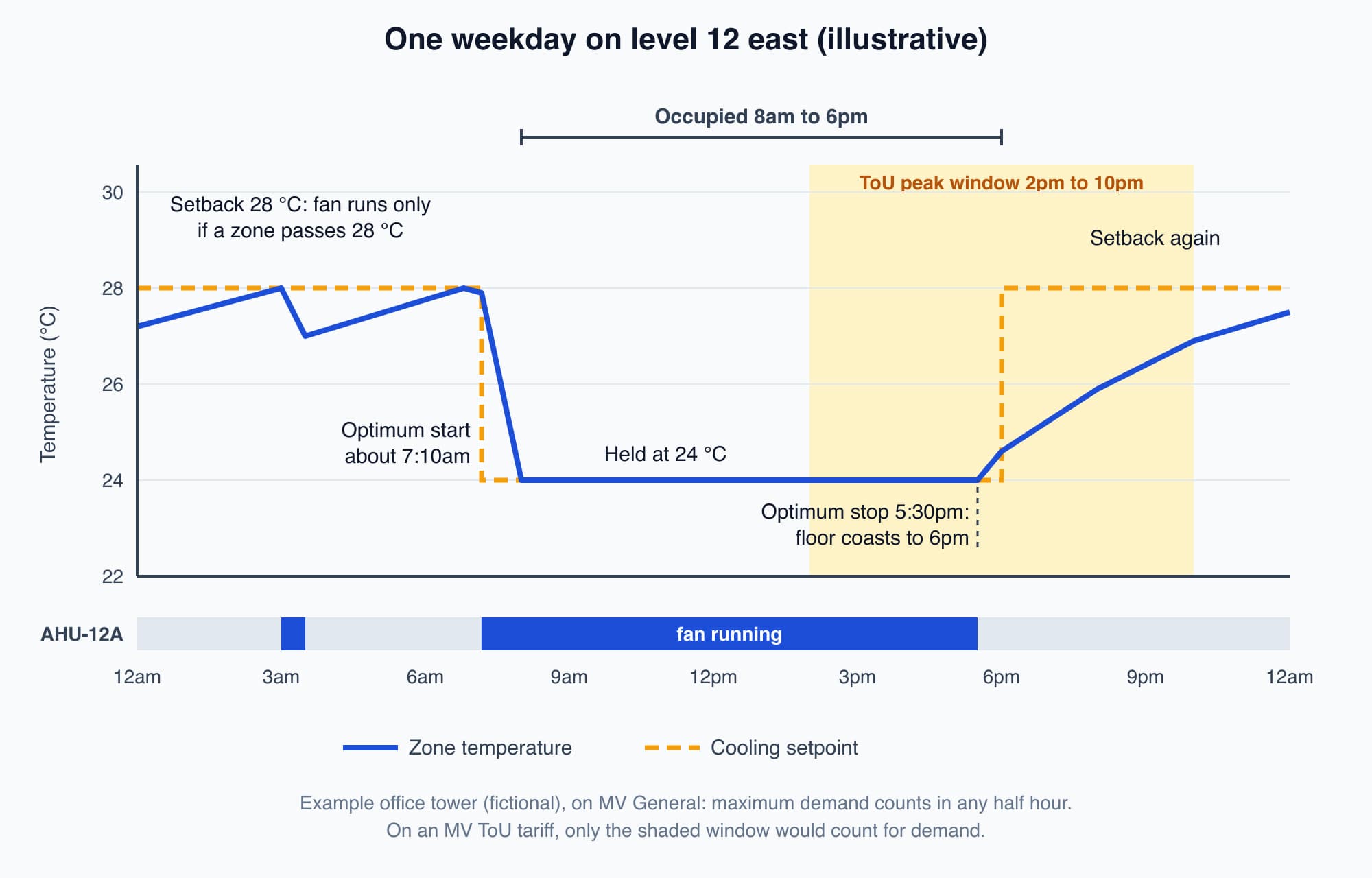
One weekday for level 12 east (illustrative). The shaded window matters for demand only on a ToU tariff. The office tower is on MV General, where every half hour counts.
Occupancy sensing stops cooling rooms that are empty
A schedule assumes that a floor is either in use or not, by the clock. Real buildings are less tidy. A meeting room is booked until 7pm but empty by 4pm, or half a floor is out visiting clients. Occupancy-based control lets the BMS respond to who is actually there.
It uses signals the building often already has:
- Motion sensors, similar to the ones that switch lights on and off, show whether anyone is moving in a zone.
- Card access data from the door system shows roughly how many people have entered a floor.
If a zone reads empty for a sustained period, the BMS can raise its setpoint early or reduce its airflow before the scheduled end of the day. If one person badges in on a Saturday, the BMS can cool just their zone instead of the whole floor or the whole tower.
Start-up timing affects the electricity bill
Scheduling saves energy (kWh) by cutting running hours. The timing of the start can also affect demand (kW), which some tariffs charge separately. (If the difference between kW and kWh is new to you, read Power vs Energy: The Difference Between kW and kWh in the Electricity Fundamentals course.)
The office tower is on TNB's (Tenaga Nasional Berhad's) Medium Voltage (MV) General tariff. Its maximum demand (MD) is the highest 30-minute average power drawn in the month, and on MV General that half hour can fall at any time of day. The tower's MD is usually set on a hot weekday afternoon, around 2:30pm to 3pm. But if the BMS started every chiller, pump and AHU at the same moment, all of them would run hard together to pull the building down to temperature. If that morning half hour averaged more than the afternoon peak, it would set the month's MD instead. (On an MV Time of Use (ToU) tariff, MD is charged only from 2pm to 10pm on weekdays, so a 7am start would not count there.)
The fix is staggered start-up: the BMS brings equipment on in steps, for example one chiller and its pumps, then the next, then the AHUs floor by floor, so they do not all pile onto the same half hour. The comfort is the same, and the demand peak is lower. Part 14 explains maximum demand, demand limiting and staggered start in full.
Worth knowing: In cold countries, "night setback" means letting a building get colder overnight to save heating. In Malaysia nothing is heated, so the setpoint moves up, not down, and some people call it a "setup" for that reason. If you hear "night setback" in a Malaysian building, it should mean a higher cooling setpoint when the building is empty.
What comes next: seeing what the building actually did
The schedule, setback and optimum start all run on their own, mostly at hours when nobody is watching. The next part, Trends, Alarms and Dashboards: The Operator's Window Into the Building, shows how the BMS records what happened and warns you when something goes wrong. It starts from this question: how would you know whether level 12 east really reached 24 °C by 8am, or whether AHU-12A ran all night?
Check your understanding
- Why does level 12 east's setpoint rise to 27 to 28 °C at night instead of the cooling being switched fully off? With no cooling at all, heat and humidity build up overnight, and the building needs a large, expensive burst of cooling to recover in the morning. Raising the setpoint lets the cooling rest most of the night but still start if the floor gets warmer than 28 °C, which keeps heat and damp in check.
- The office tower is on MV General. If every chiller, pump and AHU starts at 7am together, can that affect the bill? Would the answer change on MV ToU? Yes, it can. On MV General, maximum demand counts at any hour, so if that morning half hour averages more kW than the usual afternoon peak, it sets the month's MD. On MV ToU, MD is charged only from 2pm to 10pm on weekdays, so a 7am start would not set the billed MD. Staggering the start avoids the risk on either tariff.
Recap: A BMS controls time as well as temperature. Time schedules, with weekend and public holiday calendars, stop the plant running when nobody is in. Unoccupied setback raises the cooling setpoint (to 27 to 28 °C in our example) instead of switching off. Optimum start learns how long the building takes to cool and starts just early enough, earlier on hot mornings and later on mild ones. Optimum stop lets the building coast on its thermal mass before closing. Occupancy sensing cools only the zones with people in them. Start-up should be staggered so equipment does not all run hard in the same half hour, and which half hours count for demand depends on the tariff.
This is Part 7 of 16 in Cobler's Building Automation and BMS Fundamentals course. Previous: What Is a Sequence of Operation in a BMS?. Next: Trends, Alarms and Dashboards: The Operator's Window Into the Building.
Cobler builds CobiNeural, a platform that shows a facility team its building's energy, water and indoor air data as live numbers across the whole site. To see how your building performs, talk to us.
FAQ
Frequently asked questions
Ask us about this topic
Something in this article you want to dig into — or a situation in your own building it doesn't quite cover? Send us your question. We don't run public comments; the team replies to you directly by email.