Blog
BACnet vs Modbus: The Two Languages Building Equipment Speaks
Understand the BACnet vs Modbus difference in plain terms: self-describing data versus numbered registers, and why the choice shapes an open building.
 Tan Kok XinBuilding Automation & BMS Fundamentals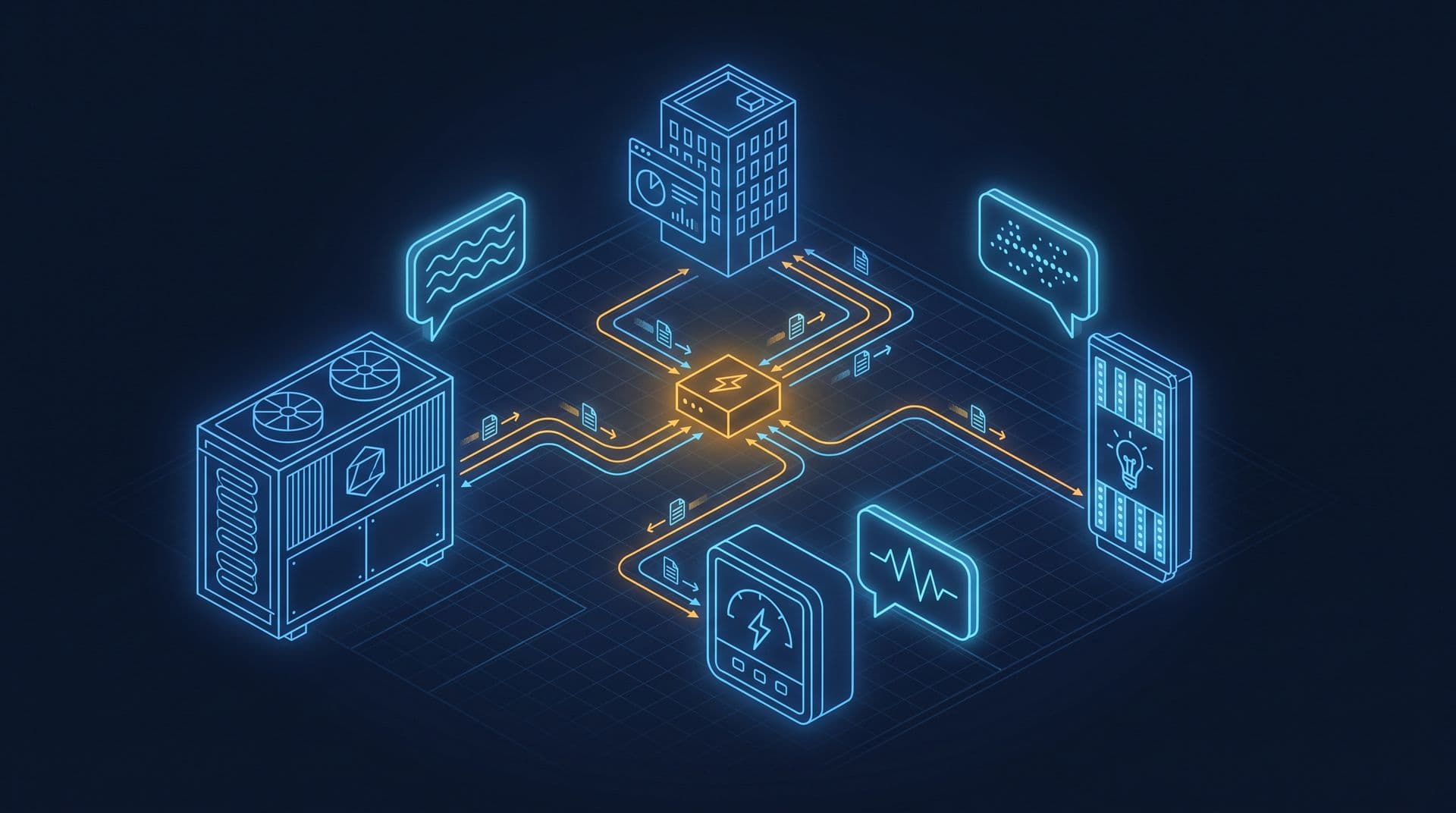
Part 9 of 16 in Cobler's Building Automation and BMS Fundamentals course. New here? See the course page.
Part 8 showed the operator's window into the building and ended on a question: how does a reading from another maker's equipment, such as a chiller, reach the BMS (building management system) in a form it understands? A value such as AHU-12A's return air temperature of 23.5 °C starts in a sensor wired to the AHU's own controller. The chillers in the office tower's basement come from a different maker, and so do the power meters and the pump drives. For the BMS to show and use all of their numbers on one screen, every device has to send its data in a form the others understand.
The rules for that form are called a protocol. The two protocols you will meet most often in buildings are Modbus and BACnet. The main BACnet vs Modbus difference is this: a Modbus device sends bare numbers, and you need a separate list from the manufacturer to know what each number means. A BACnet device sends each value with its name and units attached. This part explains both, why most buildings use both, and why the choice matters to the owner.
Connecting the wires is not enough; devices must agree on meaning
Getting a signal from one box to another is usually the easy part. Cables, voltages and network sockets are standard. The harder part is meaning.
Suppose a chiller sends the number 43. Is that 43 °C, 4.3 °C, 43% or something else? The chiller knows, but the receiving controller cannot tell from the number alone. Two devices can be wired together perfectly and still exchange numbers that neither can interpret.
A protocol solves this by setting the rules both sides follow: how a question is asked, how an answer is sent and how the data is laid out. Modbus and BACnet set those rules in different ways, and that difference shapes how much work it takes to connect equipment.
Modbus stores numbers in numbered registers, without labels
Modbus is the older of the two. It was created in the late 1970s so that a controller could talk to factory equipment, and it is still popular because it is simple.
A useful way to picture a Modbus device is a wall of numbered pigeonholes called registers. Each register holds one number and nothing else. For example, one of the office tower's chillers might report:
- Register 40001 holds 60.
- Register 40002 holds 1.
That is all Modbus itself tells you. The numbers carry no built-in meaning. To learn that register 40001 is "chilled water supply temperature, in tenths of a degree Celsius", so 60 means 6.0 °C, you need a separate document from the manufacturer called the register map. Without the register map, the numbers cannot be read correctly. (The register numbers and values here are an example. Every manufacturer's map is different, which is exactly why the map is needed.)
Modbus also has a fixed way of talking. One device, traditionally called the master, asks all the questions. The other devices, the slaves, answer only when asked. They never send data on their own and never talk to each other. (Newer Modbus documents call these roles client and server; the idea is the same.)
This makes Modbus light, predictable and cheap to build into a product. That is why it is common at the equipment level: a single power meter, one variable speed drive (VSD) or a packaged chiller that only needs to expose a few dozen values. A numbered list is enough for a box like that.
BACnet sends each value with its name and units
BACnet (Building Automation and Control network) was designed later, and designed specifically for buildings. It deals with the labelling problem directly: every BACnet data point is self-describing.
In BACnet, each point is an object with a set of named properties. Instead of "register 40001 = 60", AHU-12A's controller might offer a point that says, in effect:
- Object: Analog Input 3
- Name: AHU-12A Return Air Temperature
- Present value: 23.5
- Units: degrees Celsius
The meaning travels with the number. A BMS reading this point does not need a separate map to know what it is or what units it uses.
BACnet also lets devices talk more freely. Any device can ask, answer or share information with any other device on the network, rather than waiting for one master to ask. This is called peer-to-peer communication. It also allows discovery: a new BACnet controller can be found on the network and its points listed, without anyone typing in a register map first.
| Modbus | BACnet |
|---|---|---|
What a value looks like | A bare number in a numbered register | A named object with a value and units |
How you know what it means | The manufacturer's register map | The point describes itself |
Who talks | One master asks; the others only answer | Any device can ask or answer |
Where it is common | Single pieces of equipment: meters, drives, chillers | Building-wide systems: HVAC controllers, supervisory controllers, the head-end |
Most buildings use both, one for the building and one for the box
A practical rule of thumb:
- BACnet is common at the building-system level: the network that joins the air-conditioning controllers, the supervisory controllers and the head-end software the operators use.
- Modbus is common at the equipment level: an individual chiller, a power meter, a variable speed drive or a packaged unit.
There are exceptions both ways, so treat this as a guide, not a law. A short way to remember it: BACnet is the language of the building, and Modbus is the language of the box.
These two are not an either/or choice. Most real buildings use both at the same time. The office tower is a typical case. Its BMS runs on BACnet over the building's ordinary computer network (called BACnet/IP), and AHU-12A's controller speaks BACnet. The chillers, however, send their data over Modbus. For the BMS to see the chillers, something has to translate.
A gateway translates between the two, using a hand-built map
That translator is a gateway, sometimes called a protocol gateway or integration device. It is a small piece of hardware or software that sits between two protocols and converts messages both ways. On one side it reads the chiller's Modbus registers. On the other side it offers the same values as named BACnet objects that the rest of the BMS understands.
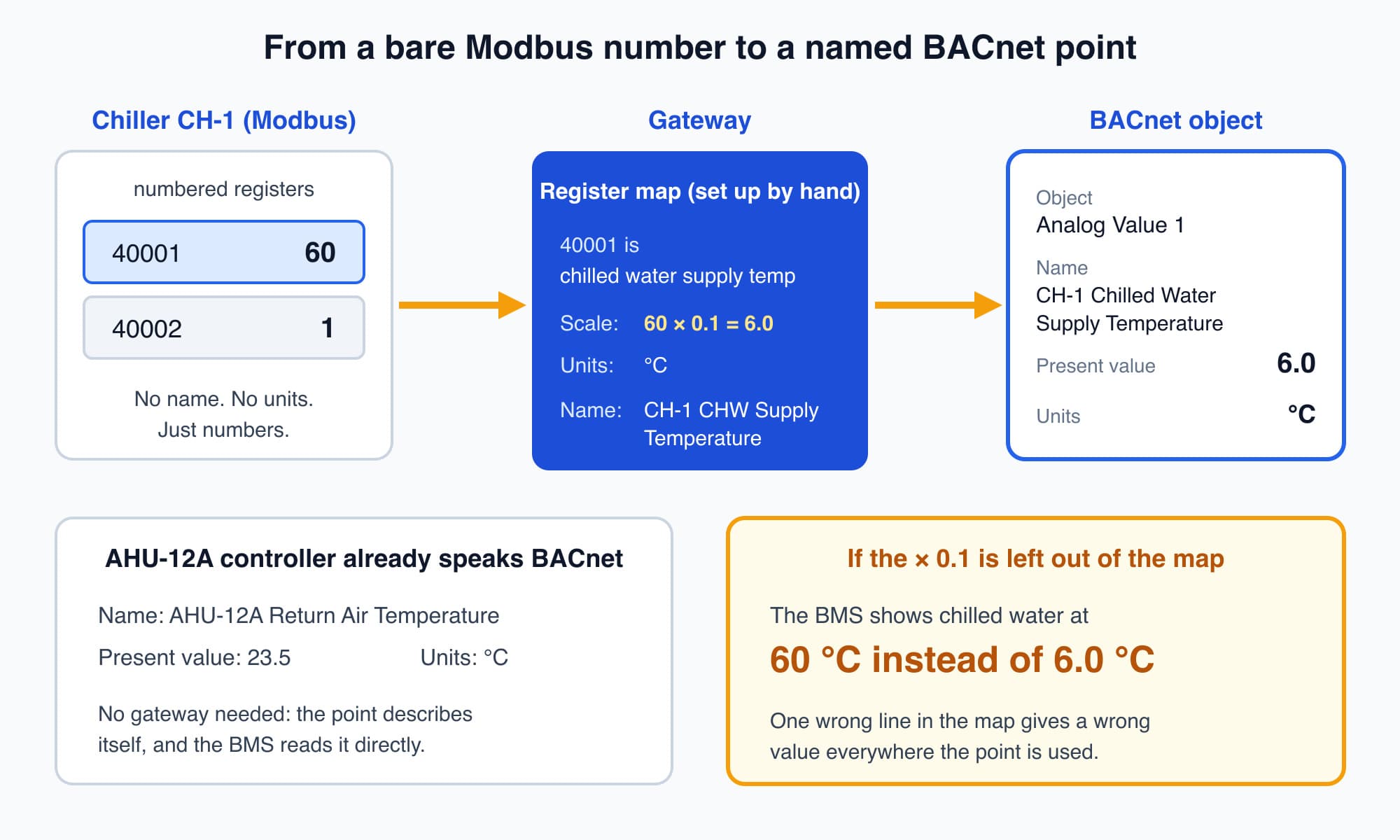
The gateway uses the register map to turn a bare Modbus number into a named BACnet point with the right units.
Gateways are useful and very common, but they come with a cost. For every value, someone has to read the manufacturer's register map and set up the gateway by hand: "Modbus register 40001, in tenths of a degree, becomes the BACnet object CH-1 Chilled Water Supply Temperature, in °C." That mapping has to be documented and kept up to date. If one scaling factor is wrong, the BMS shows the wrong value. Forget the "× 0.1" in our example and the screen shows chilled water at 60 °C instead of 6.0 °C.
This is why a poor protocol strategy can turn an integration into a translation project. One or two gateways bringing a few Modbus devices into a BACnet building is routine work. A building made of dozens of mismatched protocols, each needing its own hand-mapped gateway, has a maintenance burden that never goes away. It is also where mislabelled or wrongly scaled data can sit unnoticed until a bill or a comfort complaint brings it to light. Part 10 walks through a full point-mapping example, step by step.
Other protocol names you may hear
BACnet and Modbus are the two you will meet most. A few other names appear on building projects. You do not need to learn them now; it is enough to recognise them:
- LonWorks: an older building automation protocol that competed with BACnet in earlier decades. It is still found in many existing systems, so you may meet it in an older building.
- KNX: common in lighting, blinds and room-level control, especially in buildings designed to European practice.
- OPC UA: a more modern standard from the industrial world. It is mainly used to move data securely up to IT systems, dashboards and the cloud, rather than to control equipment on the plant room floor.
For most commercial buildings in Malaysia, the usual pattern is BACnet at the building level and Modbus at the equipment level, with these others appearing in particular corners.
The protocol choice decides how open the building stays
It is tempting to leave all of this to the contractor. But the protocol strategy is decided early and affects the building for its whole life, because it decides how open, expandable and tied to one supplier the building is.
Compare two buildings.
The first was specified around open, documented protocols: published register maps and standard BACnet objects with clear names. Five years later a chiller needs replacing, or a new tenant wants sub-metering. The owner can invite several suppliers to bid, because any competent supplier's equipment can be read and integrated. Competition keeps prices fair.
The second was handed over as a closed box: a proprietary system whose points are undocumented or locked, where only the original installer holds the register maps and the know-how. Every later change goes back to that one company, at its price. The building works, but the owner has lost the ability to choose. This is called vendor lock-in.
You do not need to memorise acronyms to avoid this. You need to ask a few questions before handover, and keep the answers:
- Are the points open BACnet objects or Modbus registers that another supplier can read?
- Who holds the register maps and the gateway mapping, and do we have our own copy?
- Are any points or controllers locked so that only the installer can change them?
An owner who can ask these questions stays in control of the building. Part 11 covers the other half of ownership: who controls access to the BMS network and keeps its backups.
Worth knowing: A BACnet point is only as clear as the naming rules the installer followed. The units and object types are standard, but the name ("AHU-12A Return Air Temperature") is text chosen by whoever set up the controller. That is why a good BMS specification asks for a consistent naming convention.
What comes next: joining mixed and older equipment into one BMS
You now know the two main languages and the translator that sits between them. Real buildings are harder than one chiller and one gateway. The next part, Integrating Mixed-Vendor and Legacy Systems Into One BMS, shows how that is done, including a full point-mapping example for the office tower's chiller. It answers this question: how do you join equipment from different makers and different decades, some of it badly documented, into one BMS?
Check your understanding
- A Modbus power meter reports "register 40005 = 4123". What do you need before you can use this number? The manufacturer's register map. It tells you what register 40005 measures, its units and any scaling (for example, whether 4123 means 4,123 kW or 412.3 kW). Modbus itself does not carry that meaning.
- Why does the office tower need a gateway, even though its BMS runs on BACnet? Its chillers send data over Modbus. The gateway reads their Modbus registers and republishes the values as named BACnet objects, so the BACnet BMS can display, trend and alarm on them.
Recap: A protocol is the set of rules devices use to exchange data. Modbus stores bare numbers in numbered registers, and you need the manufacturer's register map to know what they mean; one master asks and the others answer. BACnet sends each value as a named object with units, lets any device talk to any other and supports discovery. Most buildings use BACnet for the building and Modbus for individual equipment, joined by gateways that someone must map and document by hand. Open, documented points keep the owner free to choose suppliers later.
Go deeper on video (optional)
This short video walks through BACnet objects in more detail. It is optional: the BACnet section above covers what you need for the next part.
RealPars walks through BACnet in plain terms, showing how its self-describing objects let building equipment from different vendors speak a common language.
This is Part 9 of 16 in Cobler's Building Automation and BMS Fundamentals course. Previous: Trends, Alarms and Dashboards: The Operator's Window Into the Building. Next: Integrating Mixed-Vendor and Legacy Systems Into One BMS.
Cobler builds CobiNeural, a platform that shows a facility team its building's energy, water and indoor air data as live numbers across the whole site. To see how your building performs, talk to us.
FAQ
Frequently asked questions
Ask us about this topic
Something in this article you want to dig into — or a situation in your own building it doesn't quite cover? Send us your question. We don't run public comments; the team replies to you directly by email.