Blog
Memory: Latches, Registers and RAM
An adder's answer vanishes when its inputs change, so how does a computer remember? Part 4 builds memory from gates: a latch that holds one bit, a clock and flip-flop, registers, rows picked by a decoder, and why 16 GB of RAM is about 137 billion bits that all forget when the power goes.
 Tan Kok XinHow a Computer Works
Part 4 of 13 in Cobler's How a Computer Works course. New here? Start with the course map.
Press the call button for a lift and let go. The button stays lit until the lift arrives, so something in the lift's controller remembered that you pressed it, long after your finger left. Part 3 left us with exactly the opposite, an adder whose answer disappears the moment its inputs change. So how do we build a switch that remembers, out of gates that forget? The question is really how computer memory works, and it starts with a trick from the plant room.
The seal-in
If you've read Electricity Part 6, you've already met a circuit that remembers. A motor's start button feeds a relay's coil, and one of the relay's own contacts is wired in parallel with the button. Press start, and the relay pulls in and its own contact closes. Now let go. The button springs open, but current still reaches the coil through that contact, so the relay holds itself on. Press the stop button, which breaks the circuit, and the relay drops out and stays out. And if the power fails, the coil drops out too, and the motor stays off when the power comes back.
That's called a seal-in. The trick is feedback. The relay's output is fed back into its own input, so once it's on, it keeps itself on.
The latch
So what if we do the same with gates? Let's take two NAND gates from Part 2 and cross them over, so that each one's output feeds one of the other's inputs. That leaves one spare input on each gate, and those become our set and reset lines. While nobody's pressing anything, both of them sit at 1. We'll call the top gate's output Q, and that's our stored bit.
Now we only need NAND's one rule. It gives 0 when both inputs are 1, and 1 whenever any input is 0. Say Q is 1. The bottom gate sees 1 from reset and 1 from Q, so it gives 0. The top gate sees that 0, so it gives 1, and that keeps Q at 1. Now say Q is 0 instead. The bottom gate sees a 0 from Q, so it gives 1, and the top gate sees 1 and 1, so it gives 0, which keeps Q at 0. So the pair has two steady states, and it stays in whichever one it's in.
To change it, we press set, which drops the set line to 0 for a moment. The top gate now has a 0 going in, so it gives 1, and Q flips to 1. The bottom gate sees that and gives 0, and now that 0 holds the top gate at 1. So when we let go of set, Q stays at 1. Pressing reset does the same thing the other way round. This is the seal-in circuit again, built from eight transistors instead of a relay, and we call it a latch. One latch holds one bit.
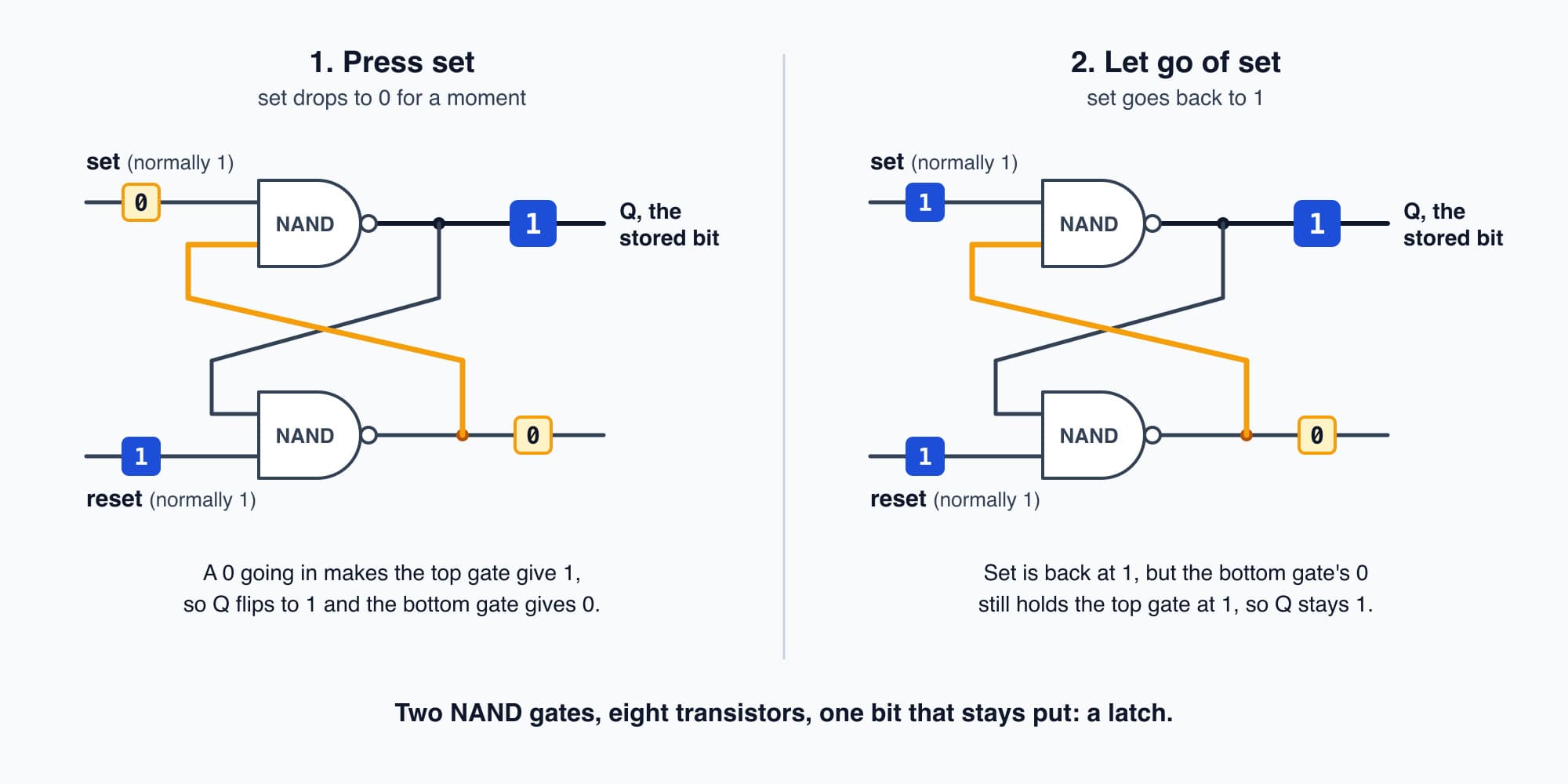
Each gate's output feeds the other's input, so the pair holds its bit after set is let go, like the relay seal-in.
The clock and the flip-flop
So a latch can remember. But it has a problem, because it changes the moment its input changes. Remember the ripple in Part 3's adder. While the carries are still rippling through, the outputs flicker through wrong answers for a moment before they settle. A latch wired straight to the adder would grab some of those wrong answers.
So what if we tell the memory exactly when to listen? We give the whole chip a steady beat, a signal that switches between 0 and 1 at a fixed rate. It comes from a small oscillator circuit, kept on time by a tiny vibrating quartz crystal, and we call it the clock. Then we build a version of the latch that only takes in its input at one instant in each beat, the moment the clock goes from 0 to 1, and ignores its input the rest of the time. The usual way is two latches in a row, the first listening while the clock is 0 and the second while it's 1, so nothing gets all the way through except on the tick. That's what we call a flip-flop.
Now the adder has the whole gap between two ticks to settle, and only its final answer gets stored. And that gap is what sets a chip's speed. A laptop processor ticks a few billion times a second. At 3 billion a second (illustrative), one tick lasts a third of a billionth of a second, and in that time light only travels about 10 cm. Every adder on the chip has to settle inside that.
Registers
One flip-flop holds one bit. So to hold a number we line them up side by side on the same clock, and they take in a whole number at once on the tick. A row of flip-flops like that is what we call a register. Eight of them hold a byte. Twelve of them can hold the 400 from Part 3's subtraction, as 0001 1001 0000.
Each register also gets a wire that says "load". When it's 0, the flip-flops keep what they've got, tick after tick. When it's 1, they take in the new number on the next tick. So now the 400 stays put even while the adder moves on to its next sum, and it's still there when we need it.
How computer memory works
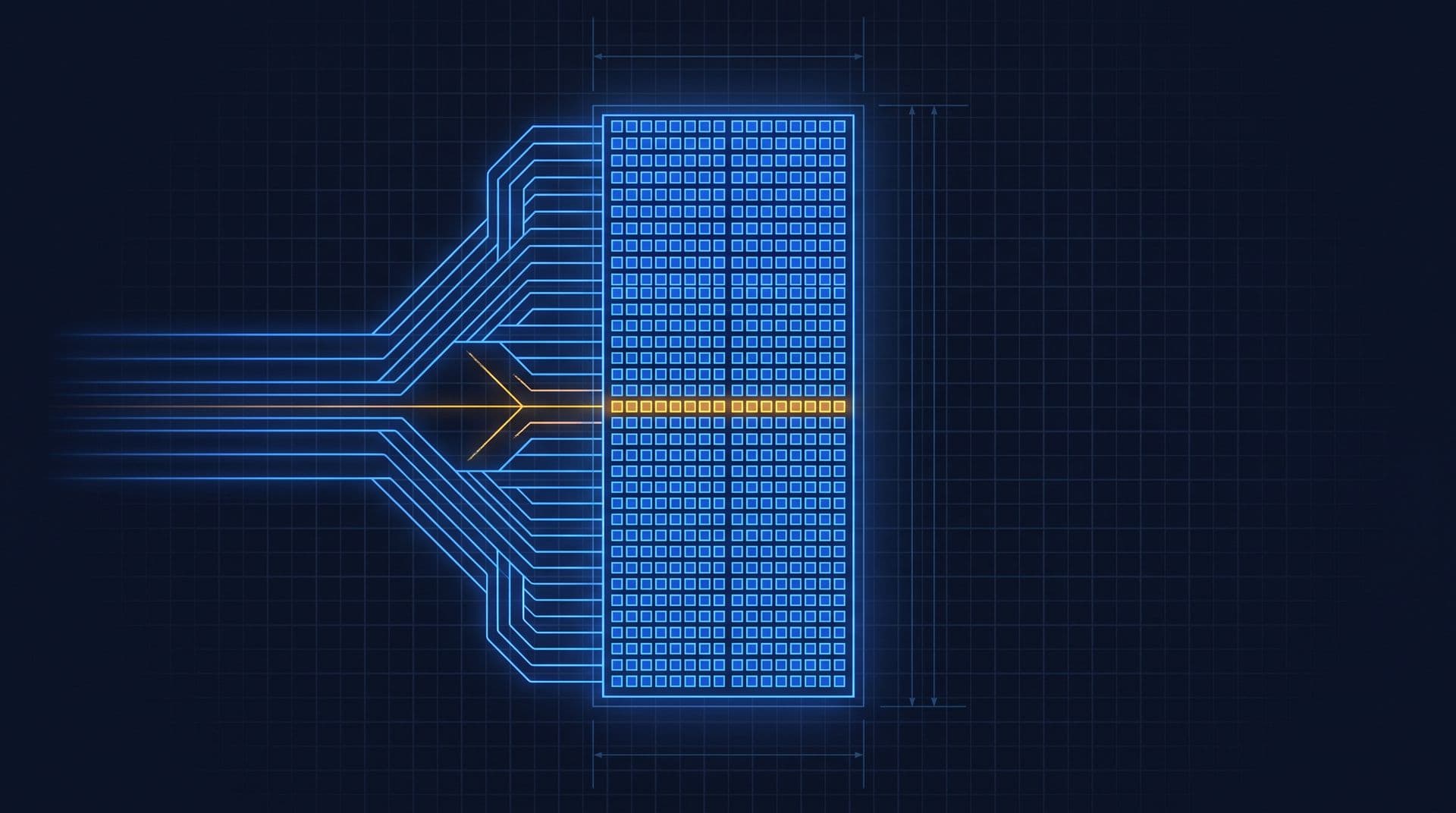
But a processor only has a handful of registers, and a laptop has billions of numbers to keep. So we stack rows of them, like the drawers of a filing cabinet, and give each row a number, which we call its address. Then we only need two more things, a way to pick one row from its address, and wires that carry a number in or out of whichever row is picked.
The picking is done by a decoder, and it's just gates again. Say we have four rows, with addresses 00, 01, 10 and 11. Each row gets one AND gate that looks for its own address. Row 10's gate takes the first address bit as it is and the second one through a NOT, so it only gives 1 when the address is exactly 1 then 0. The other three gates each look for their own pattern, so whatever address we send, exactly one row's wire goes to 1. With four address bits we can pick any one of 16 rows, and every extra address bit doubles the rows, the same doubling we saw with switches in Part 1. That's why memory comes in powers of two.
Now let's write a number. We put the address on the address wires, say 1100 for row 12, put the number on the data wires, say 600, and switch on a write signal. Only row 12's flip-flops get both the decoder's 1 and the write signal, so only they take it in. To read it back, we put 1100 on the address wires again, and row 12 connects its outputs to the data wires while every other row stays disconnected. Out comes 600. Any row is as quick to reach as any other, and that's why we call it random-access memory, or RAM.
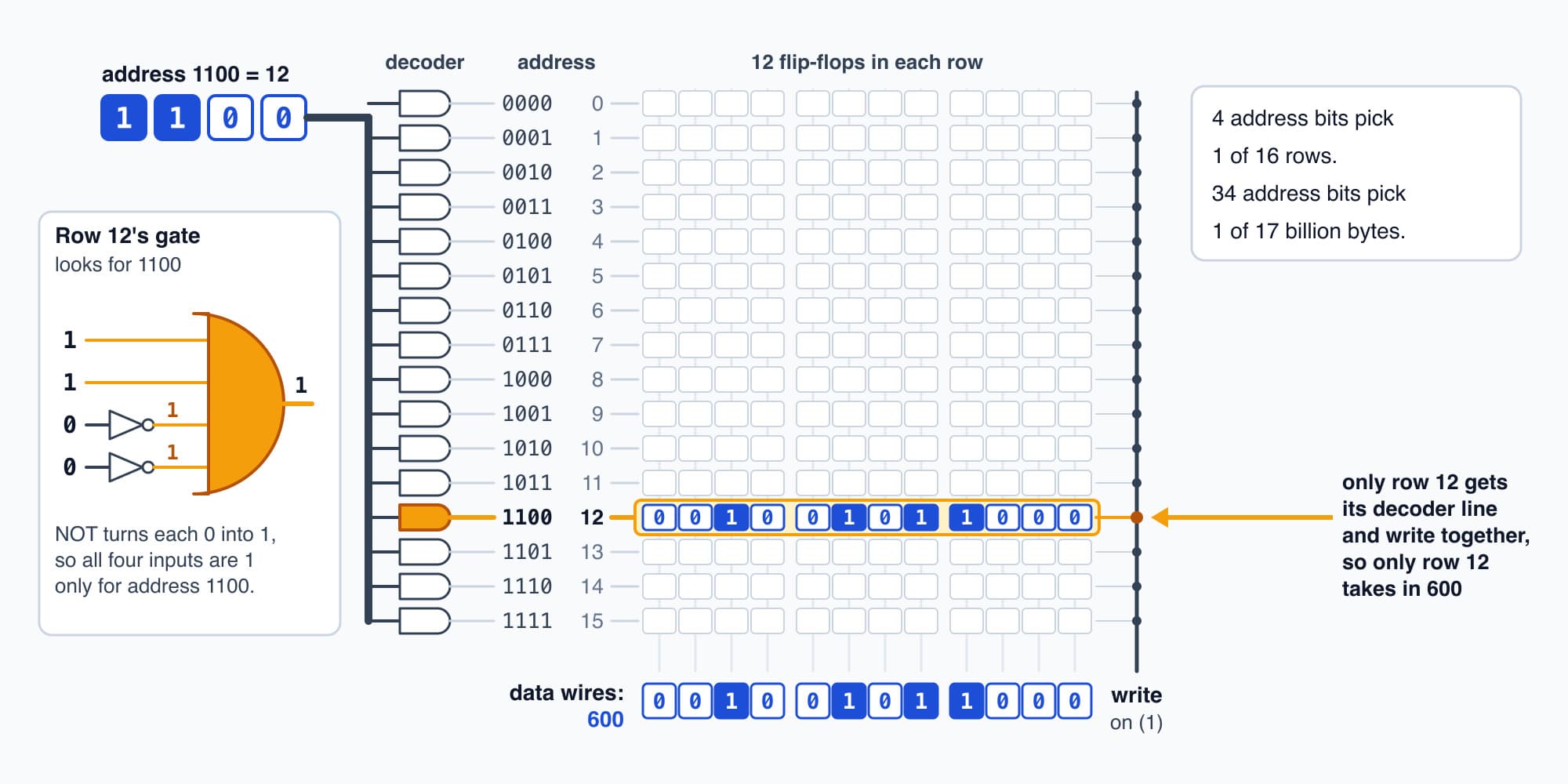
The decoder turns the address 1100 into one live row, so only row 12 takes in 600 when write is on.
RAM forgets
Now let's switch it off. The latch only held its bit because current kept flowing round its two gates, the same way the seal-in only held while its coil had power. Cut the power and every latch lets go, like a sealed-in motor that doesn't restart by itself after a power cut. When the power comes back, each latch settles into 0 or 1 more or less at random, so the 600 is gone.
The main memory in a laptop forgets even faster. A latch takes several transistors for every bit, which is fine for registers but far too many for billions of bits. So main memory keeps each bit as a tiny charge on a capacitor, which is basically a bucket that's either full or empty, with one transistor as its door. The buckets leak, so the memory chip reads and refills every one of them many times a second, and that refilling is what the D in DRAM, dynamic RAM, is about. Lose the power and the buckets empty almost at once. Memory that needs power to keep its bits is called volatile.
16 GB of RAM
So let's put a number on a laptop's memory. 16 GB of RAM, counted in powers of two, is
$$16 \times 2^{30} \ \text{bytes} \times 8 \ \text{bits per byte} = 137{,}438{,}953{,}472 \ \text{bits}$$
That's about 137 billion bits, each in its own tiny cell. And because \(16 \times 2^{30}\) is \(2^{34}\), 34 address wires are enough to pick out any one of its 17 billion bytes.
And this is what "more RAM" really buys you. Every app you have open, and every browser tab, keeps its numbers in RAM while it's open. When RAM fills up, the computer has to park some of them on its drive, and the drive is slower. An SSD reads about 3 GB a second, against tens of GB a second for RAM (both illustrative), so switching back to that tab means waiting while its numbers are copied back. With more RAM, more things stay ready at once.
Try it. How many address bits does a memory with 1,024 rows need? And what's the highest address, in binary?
Show the worked answer
Each address bit doubles the rows, so we need the number of 2s that multiply together to make 1,024. That's ten of them, so 10 address bits.
The rows are numbered 0 to 1,023, so the highest address is all ten bits on, 11 1111 1111, which is 512 + 256 + 128 + 64 + 32 + 16 + 8 + 4 + 2 + 1 = 1,023.
The controller's setpoints
So let's look inside the level 9 AHU controller. Its demand-controlled ventilation sequence (illustrative, from Electricity Part 20) starts opening the fresh-air damper at 600 ppm and has it fully open by 900 ppm. Those two setpoints are numbers in the controller's memory, each in its own row, and 600 is stored as 0010 0101 1000. Next to them sit the latest CO2 reading, the answer from the last subtraction and the damper position the controller is sending out. Each time round its program, it reads the setpoints from their rows, uses them, and writes the new damper position back to its row.
So when a technician changes the start point from 600 to 650 on the controller's screen, all that really happens is that one row of memory gets a new number.
And since RAM forgets, the controller can't keep its only copy of those setpoints there, or a power cut would wipe them. So controllers also keep a copy in memory that holds its bits with the power off, such as flash, and copy it back into RAM when they start up. Part 9 opens up flash.
Try it. Write the 900 ppm setpoint as 12 switches, the way the controller stores it.
Show the worked answer
The biggest switch values that fit are 512, 256 and 128, which add up to 896, and then 4 makes 900. So the switches worth 512, 256, 128 and 4 are on, and in twelve bits that's 0011 1000 0100.
Nobody in charge
So now we have everything a computer needs to hold numbers and work on them. The ALU from Part 3 can add, subtract and compare, registers can hold its answers, and RAM can hold billions more numbers in numbered rows. But think about how we used them. Every time, it was us who put the address on the wires, set the ALU's chooser bits and switched on write. Each part can do one step, but nothing decides which step comes next, or carries an answer from one part to another. So who's in charge? That's Part 5: The Processor.
This is Part 4 of 13 in Cobler's How a Computer Works course. Previous: Adding in Binary: the Adder and the ALU. Next: The Processor: Fetch, Decode, Execute.
Cobler builds CobiNeural, which keeps a building's readings long after each controller has moved on to its next pass, so a facility team can look back at any night. To see it on your own site, request a demo.
FAQ
Frequently asked questions
Ask us about this topic
Something in this article you want to dig into — or a situation in your own building it doesn't quite cover? Send us your question. We don't run public comments; the team replies to you directly by email.