Blog
Lightning and Surge Protection: Why the Router Dies
The storm passes, the kettle is fine, but the router is dead. Why lightning kills your cleverest electronics and how surge protection really works in Malaysia.
 Tan Kok XinBuilding Electrical Fundamentals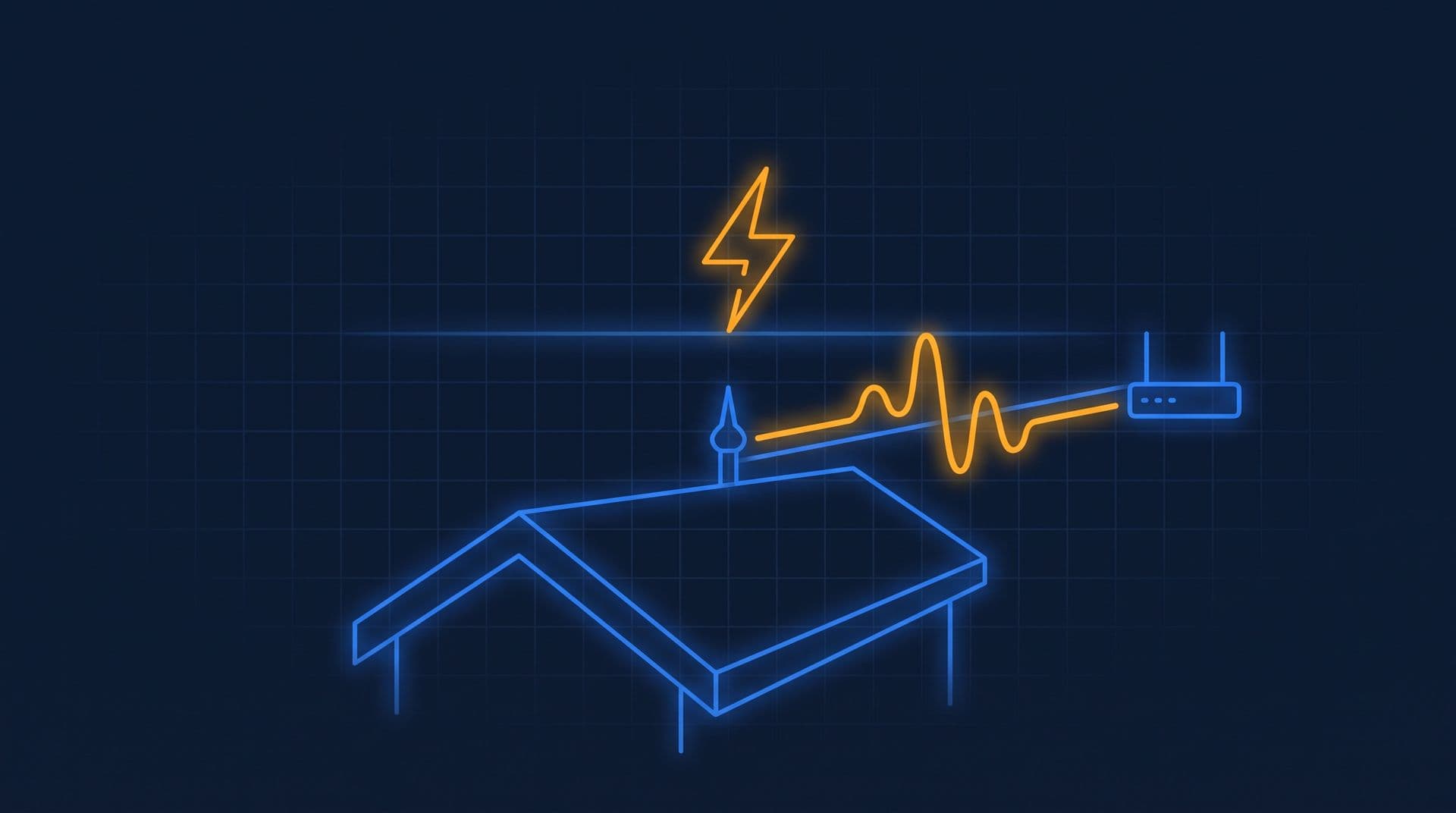
Part 7 of 11 in Cobler's Building Electrical Fundamentals course. New here? See the course page.
Part 6 showed how the protective earth gives fault current a planned path back to the source. The same earth connection matters again here, because surge protection works by sending surges to earth. Why do storms damage electronics and leave heavy equipment alone, and what does a building use to protect itself?
Picture an afternoon thunderstorm passing over the office tower. The lights stay on, the lifts keep running and the pumps never stop. But afterwards a security camera at the car park entrance shows no picture, and a controller on the roof needs a reset. At home, the same storm might leave the kettle working and the router dead.
This part explains what a surge is, how it gets into a building, and how surge protection is arranged from the main switchboard down to the equipment. What Is Electricity, Actually? in the Electricity Fundamentals course describes lightning itself as a very large electric spark.
A surge is a very brief high voltage that travels along cables
A surge is a sudden rise in voltage, far above the normal 230 V, that lasts only millionths of a second (microseconds).
Lightning is the best-known cause. A lightning strike does not have to hit the building to cause a surge. When lightning strikes the ground or a power line some distance away, the very large current in the strike induces a sudden overvoltage in cables nearby. Power cables pick it up, and so do telephone lines, data cables, TV aerial cables and camera cables that run outdoors. The surge then travels along those cables into the building. Switching large loads on the power network also creates surges, usually much smaller than lightning ones.
Thunderstorms are common in Malaysia, and especially so around the Klang Valley. For a building there, surges are a regular operating condition, not a rare event.
Why a surge damages electronics but not a heater
A surge damages electronics because their parts are very small, and a heater survives because its heating element is large and heavy.
Inside every chip, power supply and network port are semiconductor junctions: the tiny switches that make electronics work. They are designed to run on a few volts and have almost no mass to absorb heat. A surge of hundreds or thousands of volts pushes energy into these tiny structures faster than they can get rid of the heat, and they can be destroyed in microseconds (Alpine Intel).
A kettle or water heater element is a heavy coil of resistance wire, designed to run red-hot. A surge adds a brief burst of extra heat that it barely notices, and there is no delicate junction to damage. The same is true of an iron or an old filament lamp.
A useful comparison is a splash of boiling water: it destroys a spider's web but barely warms a cast-iron pan. The chip is like the web, because it is small and has little mass, and the heating element is like the pan.
The equipment most often damaged is equipment connected to more than one cable. A security camera has a power cable and a video or network cable. A controller on the building management system (BMS) has power and a network connection. At home, a router has power and a phone or network line. A surge can enter through either cable and pass through the electronics on its way to the other.
A lightning protection system protects the structure, not the wiring
A building's lightning protection system handles direct strikes to the building itself. It has three parts:
- An air terminal, the lightning rod on the roof, which intercepts a direct strike.
- A down conductor, which carries the strike current down the outside of the building.
- An earth electrode, which passes that current into the ground.
This follows the same principle as the protective earth in Earthing and RCDs and Part 6: give the current a deliberate low-resistance path so that it does not find a more dangerous one. The designer decides how the lightning protection earth connects to the rest of the building's earthing; that is part of the design, not something to change on site.
The lightning protection system protects the structure from fire and physical damage. It does not stop the surges that travel into the building along power and data cables. For those, the building needs surge protective devices (SPDs).
The surge protection chain, from main switchboard to equipment
Surge protection in a building is a chain of SPDs. Each stage reduces the surge and passes what is left to the next stage. An SPD does this by diverting the surge current to earth, so every stage depends on a sound earth connection.
- Type 1 SPDs sit at the main incoming switchboard. They are built to handle the high energy from a direct or very close strike, and they remove the largest part of the surge.
- Type 2 SPDs sit at the sub-switchboards and distribution boards. They catch the overvoltage that passes the Type 1 stage and stop it spreading to the circuits.
- Type 3 SPDs sit close to sensitive equipment, for example in a "surge protected" power strip or a module near the equipment. They are the last and smallest stage, and they only work as a supplement to a Type 2 device upstream, never on their own.
In a building like the office tower, a typical arrangement would put Type 1 at the main switchboard (MSB), Type 2 at the riser sub-switchboards and floor distribution boards, and Type 3 close to sensitive equipment such as the server room. Cables that enter from outside, such as data lines and cables to outdoor cameras, need their own SPDs too, because a surge can enter through any connected conductor.
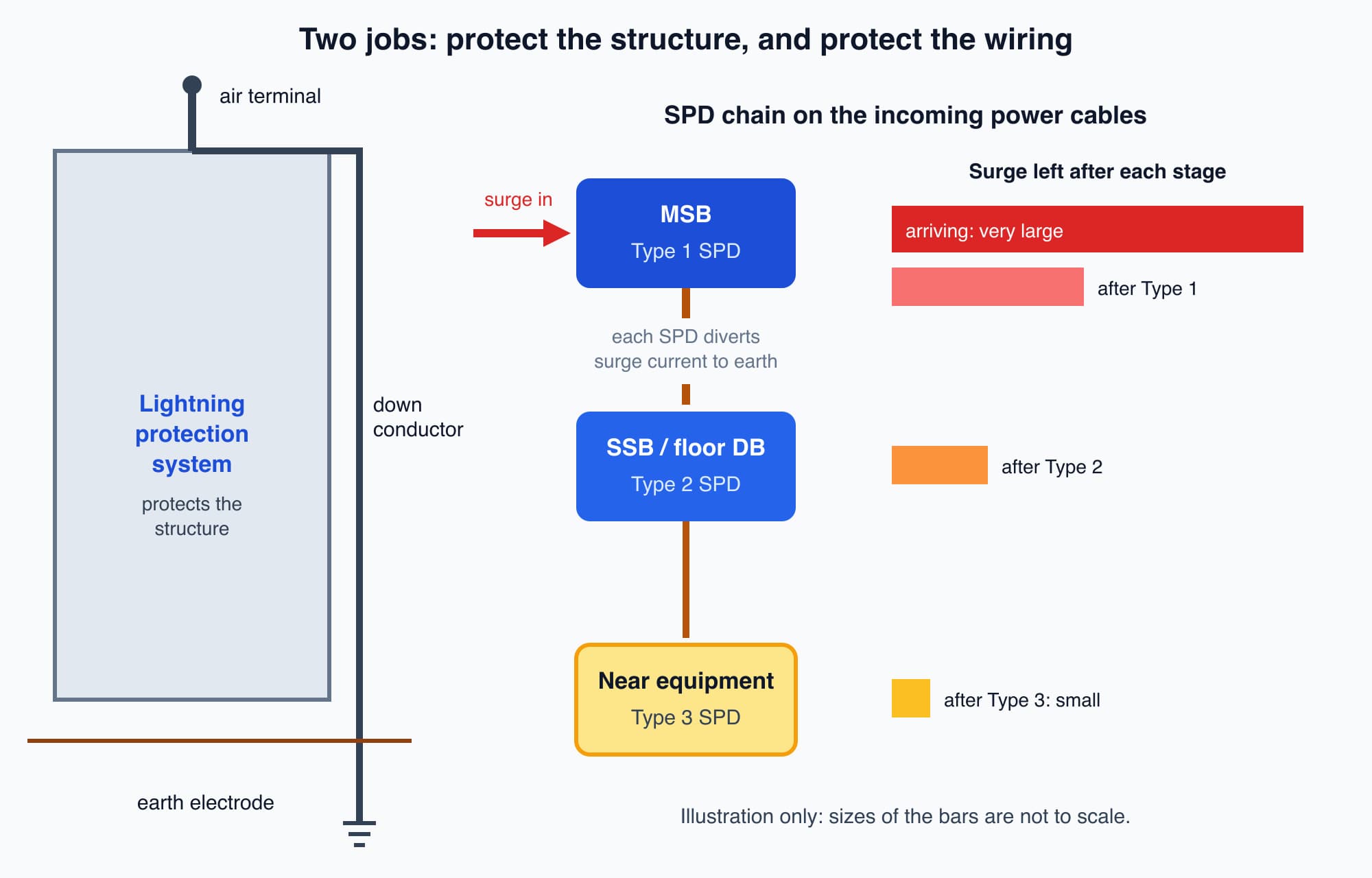
The lightning protection system protects the structure, while the chain of SPDs reduces a surge on the cables step by step before it reaches sensitive equipment.
Each stage assumes the stage before it did its job. A Type 3 power strip with no SPDs at the boards upstream faces the full surge, which is far more than it is designed to handle. Choosing the SPD types, their ratings and how they are connected is work for the competent designer.
Inside an SPD, and why it wears out
Most SPDs in boards and power strips contain a metal-oxide varistor (MOV). At normal voltage it behaves like an insulator. When the voltage rises past its threshold, its resistance falls sharply and it diverts the surge current to earth, holding the voltage down to a lower level called the clamping level.
An MOV wears out. A power strip's joule rating is its lifetime energy budget: a strip rated at 1,000 joules can absorb roughly that much surge energy over its whole life, and every surge uses some of it. Many small surges wear it out just as surely as a few large ones (Americord).
Worth knowing: When a power strip's surge budget is used up, it usually keeps supplying power as before, with no warning that its protection is gone (MakeUseOf). Some units have a status light, but some lights only show that the MOV is present, not that it is still working. Treat a surge-protected strip as a consumable: replace it every few years, and after any known large surge.
Many Type 1 and Type 2 SPD modules in boards have a status window that changes from green to red when the module has worn out. A red window means the protection has gone, even though everything downstream still runs normally.
What a facility team checks
The operator's job is to observe, record and report. Fitting, testing and replacing SPDs is work for an authorised competent person.
- Read the SPD status windows where they are visible without opening a cover. Where the SPDs sit behind a board cover, ask the competent person to include them in their rounds. Report any red or unclear window.
- Check after a large storm. Look at the status windows again, and note any equipment that failed: the time, what failed, and which cables connect to it. That record helps the competent person find where a surge entered.
- Keep records. Record when each SPD was installed or replaced. An SPD fails without any sign in normal operation, and a worn-out one looks the same as a working one until a surge arrives.
- Keep earthing checks on the maintenance plan. An SPD with a poor earth connection has nowhere to send the surge. The earthing and protection tests described in Part 6 cover this.
A storm can also affect the supply in another way. Lightning striking power lines can cause faults on the grid, which reach buildings as brief dips in voltage called voltage sags. A sag is a short drop in voltage, not a surge, and it can stop equipment even when nothing is damaged.
Optional detail: The Malaysian Meteorological Department (MetMalaysia) reports that, among its stations, Subang records the highest number of thunderstorms, followed by Bayan Lepas and Kluang (MetMalaysia, weather phenomena). Malaysia adopts the international lightning protection standard as MS IEC 62305, endorsed in 2007, and SPDs are covered by MS IEC 61643 (TAKO). The only protection no surge can get past is an air gap: at home or in a small office, unplugging an irreplaceable device during a severe storm, including its signal cables such as the aerial, phone line or outdoor network cable, is the only certain method. A building cannot unplug its main switchboard, which is why it relies on the SPD chain.
What comes next
SPDs protect equipment from brief high voltages. The next part, When the Mains Fails: Generators, ATS and UPS, looks at the opposite problem and asks: when the TNB supply is lost altogether, what keeps a building's essential loads running?
Check your understanding
- Lightning strikes a power line a few streets away. Why can a BMS controller in the building still be damaged? The strike induces a surge in nearby cables, including power and data cables. The surge travels along those cables into the building. The controller is connected to both power and network cables, so the surge can enter through either one and pass through its delicate electronics.
- A building has a lightning rod and down conductors on its roof. Does it still need SPDs? Yes. The lightning protection system protects the structure from fire and physical damage during a direct strike. It does not stop surges that travel along power and data cables. The chain of Type 1, Type 2 and Type 3 SPDs does that.
Recap: A surge is a very brief high voltage, most often caused by lightning, and it usually enters a building along its cables. Electronics fail because their parts are tiny; heating elements survive because they are heavy. The lightning protection system protects the structure. Surge protection for the wiring is a chain: Type 1 at the main switchboard, Type 2 at the distribution boards and Type 3 near sensitive equipment, each relying on the one before and on a sound earth. SPDs wear out without warning, so read their status windows, keep records and report problems to the competent person.
This is Part 7 of 11 in Cobler's Building Electrical Fundamentals course. Previous: Neutral and Earth: Why They Stay Separate (TT and TN-S). Next: When the Mains Fails: Generators, ATS and UPS.
Cobler builds CobiNeural, a platform that shows a facility team its building's energy, water and indoor air data as live numbers across the whole site. To see how your building performs, talk to us.
FAQ
Frequently asked questions
Ask us about this topic
Something in this article you want to dig into — or a situation in your own building it doesn't quite cover? Send us your question. We don't run public comments; the team replies to you directly by email.