Blog
Storage: How a Drive Keeps Files
Why does a drive remember when RAM forgets? Part 9 builds flash memory from a transistor that traps charge, then shows pages, erase blocks, the controller's map, files as lists of numbered blocks, reading into RAM by DMA, and why deleting is quick and drives wear.
 Tan Kok XinHow a Computer Works
Part 9 of 13 in Cobler's How a Computer Works course. New here? Start with the course map.
Down in the tower's security room sits the CCTV recorder. All night it's been writing the plant room camera's pictures to its drive, including CWP-2 starting up at 2 a.m. with every chiller off. If its power had blinked at 3 a.m., the first hour would still be there.
In Part 8 the tap opened the alert's panel, but its chart's readings live somewhere else, and so does the clip for the building's CCTV app. Both sit on drives that keep their numbers with the power off, which the RAM from Part 4 can't do. So how does an SSD work, and how does any drive keep a file? Let's start with one bit that has to survive the power going off.
Flash memory
In Part 4, RAM held its bits as tiny charges in buckets that leak, so the chip had to keep topping them up, and when the power went, they emptied almost at once. So how do we make a bit that stays put on its own?
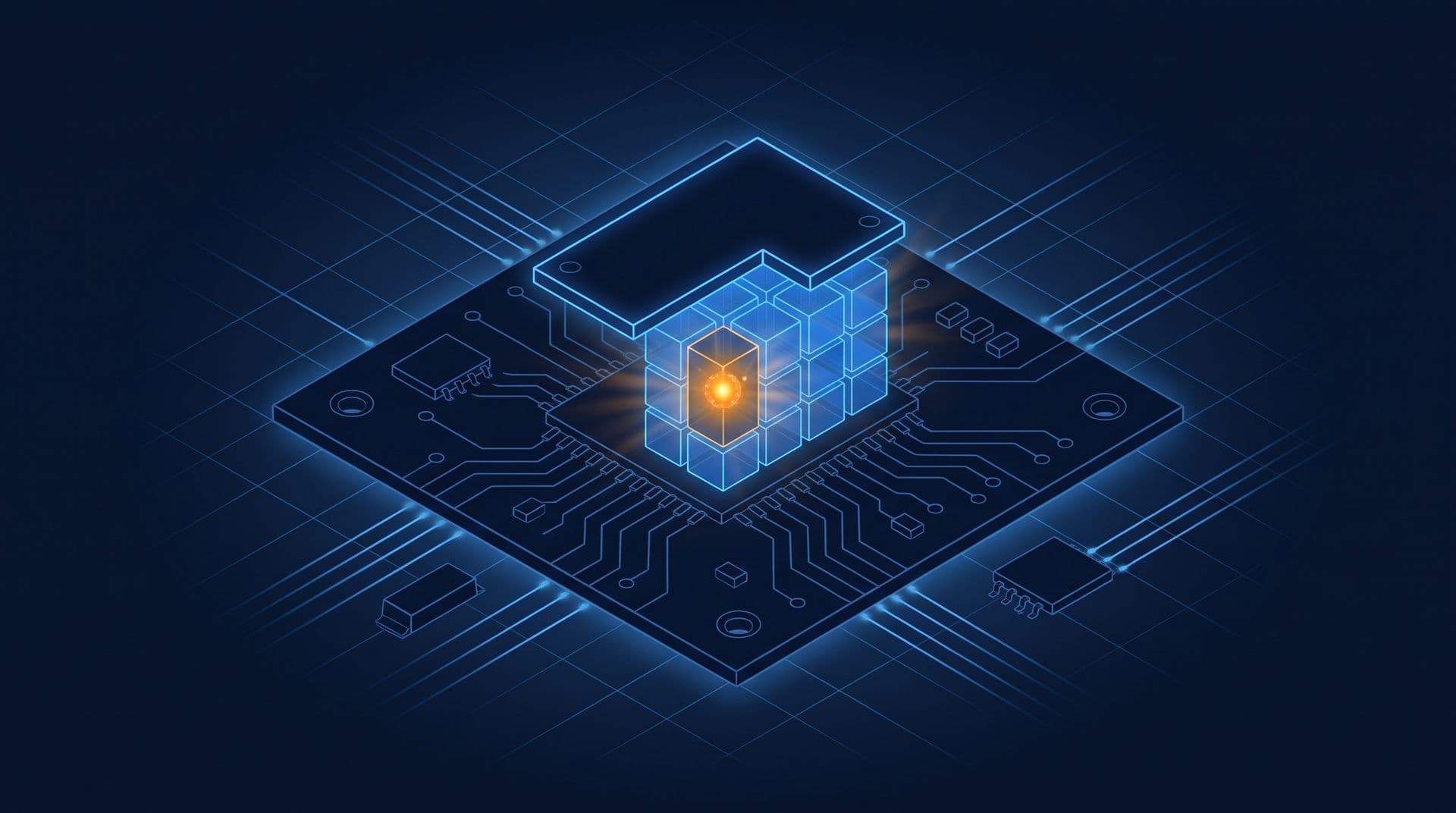
Well, what if we could trap some electric charge somewhere it can't leak away? Let's take a transistor from Part 2, where a small voltage on the gate let current through. If we look closer, that gate is a little plate sitting just above the silicon, with a thin insulator in between, and its voltage turns the path underneath on or off. Now let's add a second plate between the gate and the silicon, wrapped all round in a very thin layer of insulator, so it isn't connected to anything at all. If we put a high enough voltage on the gate, some electrons are forced right through the thin insulator onto that floating plate, and when we take the voltage away, they're stuck. The same insulator they were forced through now holds them in, for years.
Those trapped electrons are negative, so they partly cancel the gate's push, and now the transistor needs a bigger voltage on its gate before it switches on. So to read the cell, the chip puts a medium voltage on the gate and checks whether current flows. If it flows, the plate is empty. If it doesn't, the plate is charged. That's one bit, kept with the power off, and a chip full of cells like this is what we call flash memory. The extra plate is called a floating gate, and many newer chips use a thin layer that traps the charge instead, which works the same way.
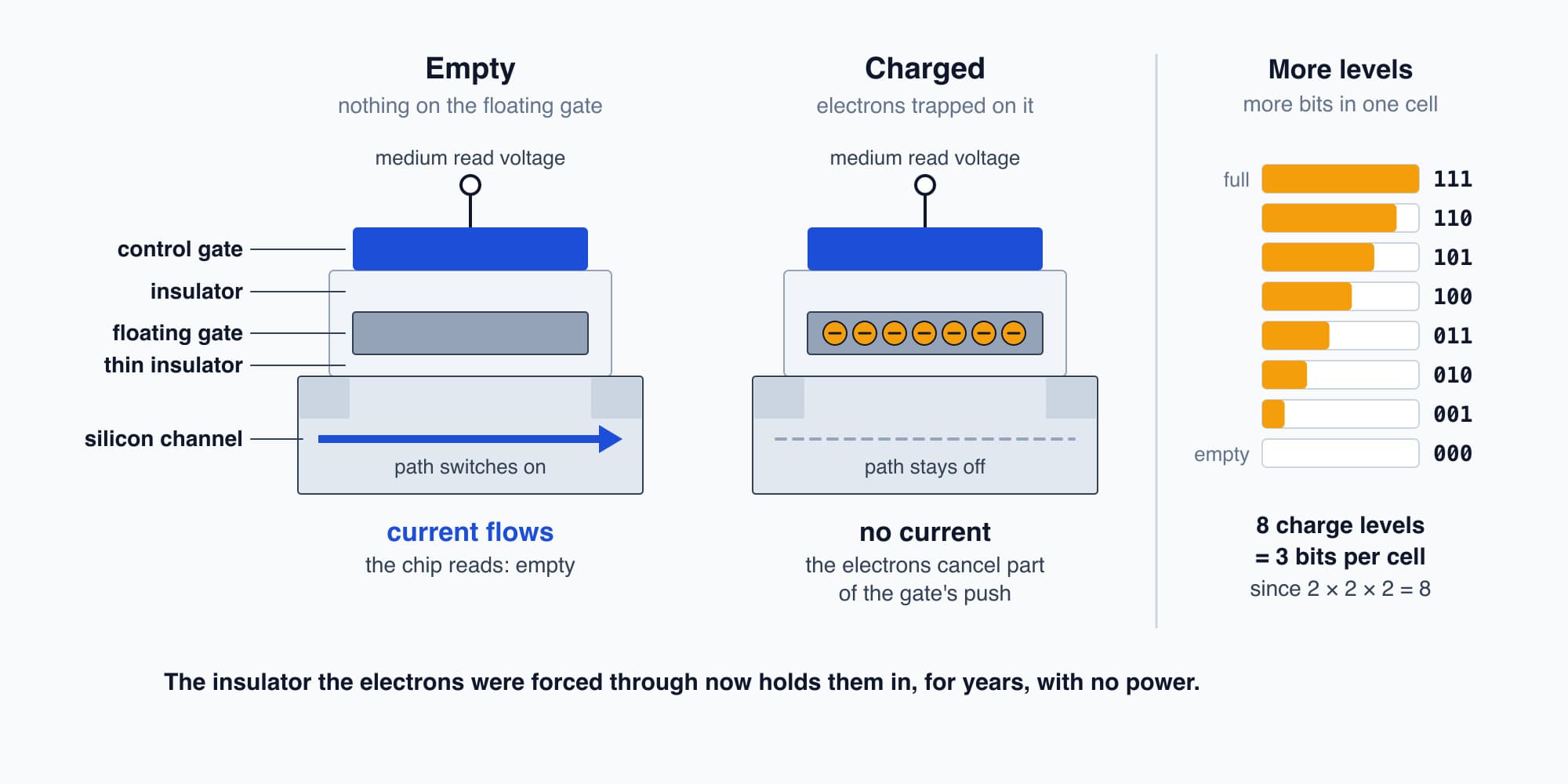
Trapped charge changes the voltage needed to switch the cell on, so it keeps its bit without power.
It gets cleverer, too. If the chip can tell eight different amounts of trapped charge apart, instead of just two, one cell holds three bits, since 2 × 2 × 2 = 8. Many of today's drives do exactly that.
How an SSD works
Now, a drive is more than a chip full of cells, because flash has two odd rules. Cells are written in groups called pages, say 16 KB each (illustrative), and a page can't simply be written again. The only way to empty its cells is to erase a much bigger group, hundreds of pages or more at once (illustrative), and we call that group an erase block.
So what happens when we change one word in a document? The drive can't overwrite the page. Instead its controller, a small processor inside the drive, writes the new version to a fresh, empty page and marks the old one as stale. Later, when an erase block is mostly stale, the controller copies its few good pages somewhere else and erases the whole block so it's ready again. That tidying is called garbage collection.
To keep track of all this moving around, the controller holds a map. The operating system sees the drive as one long row of numbered blocks, usually 4 KB each, and asks for them by number, like "give me block 5,000". The controller looks up where block 5,000 lives today, on which chip and which page, and reads it from there. So the operating system never needs to know that anything moved. A drive built this way, from flash chips and a controller with no moving parts, is what we call a solid-state drive, or SSD.
Files
So now the drive looks like a long row of numbered blocks. But we think in files, like a photo or a clip of the plant room at 2 a.m. So where do files come from?
Well, the operating system keeps a table of its own on the drive. For each file there's a name, a size, the time it was last changed, and the list of block numbers that hold its contents, in order. That table and the rules for using it are what we call a file system.
Let's save a 10 MB file. At 4 KB (4,096 bytes) per block, it needs
$$\frac{10{,}000{,}000}{4{,}096} \approx 2{,}442 \ \text{blocks}$$
The operating system finds 2,442 free blocks (they don't have to sit next to each other), writes the file into them, and adds a line to the table with the file's name and its list of block numbers.
Reading into RAM
Now let's open that file. The processor can't work on anything straight from the drive, so the file has to be copied into RAM first. But copying 10 MB one number at a time would tie the processor up for ages, so it doesn't do the copying itself.
Instead, the operating system writes a short request into memory, saying which blocks to read and the RAM address to put them at. Then it writes one number to a special address that's wired to the drive's controller (fast drives call it a doorbell), and goes back to running other programs. The drive's controller picks up the request, reads the pages from flash, and copies them straight into RAM by itself. When it's finished, it raises an interrupt, just like the mouse in Part 8. In fact the USB controller in Part 8 did a tiny version of the same thing with the mouse's few numbers. Copying straight into memory without the processor doing the work is what we call direct memory access (DMA).
So the drive is one more thing the processor only ever sees as memory, a request left at one address, a doorbell at another, and a file that turns up in RAM when it's ready.
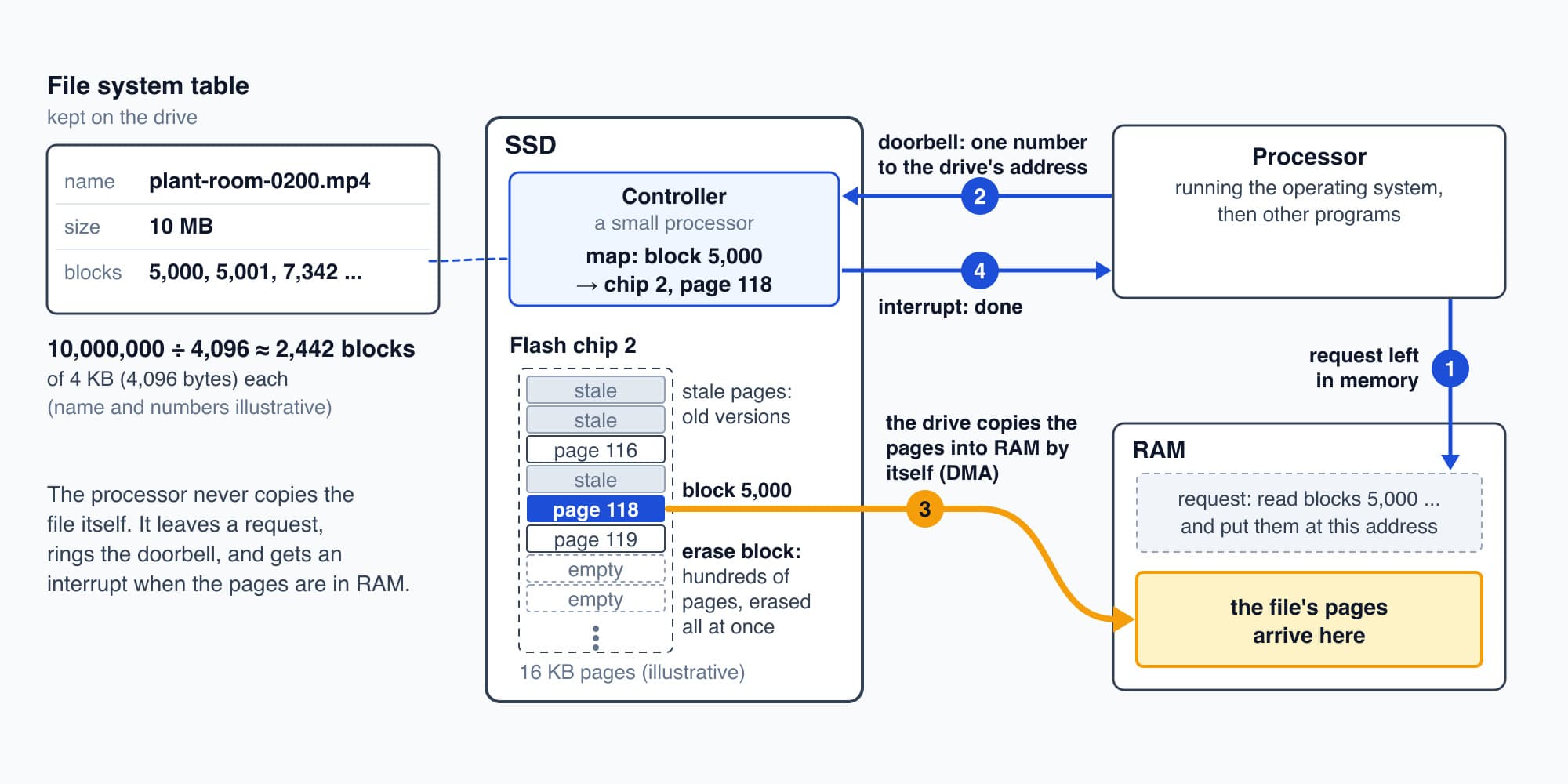
A file is a list of numbered blocks, and the drive's own controller finds them and copies them into RAM.
Speeds
So how fast is it? In Part 4 we said an SSD reads about 3 GB a second and RAM moves tens of gigabytes a second (both illustrative). So for a 1 GB file:
$$\frac{1 \ \text{GB}}{3 \ \text{GB/s}} \approx 0.33 \ \text{s}$$
Once it's in RAM, the processor can go through the same gigabyte in a few hundredths of a second. That gap is why programs copy what they need into RAM before working on it, and it's the same gap that made the parked browser tab in Part 4 slow to come back once RAM was full.
Older computers used a spinning hard disk, a magnetic platter with an arm that has to swing to the right track and wait for the right spot to come round, which takes a few milliseconds every time. Flash has no moving parts, so it can reach any block far sooner.
Deleting and wearing out
So why is deleting a file so quick, even a huge one? Well, the operating system doesn't touch the file's blocks at all. It crosses out the file's line in the table and marks its blocks as free. The numbers are still there until something new is written over them, which is why recovery tools can sometimes bring a deleted file back from a spinning disk. On an SSD, the operating system also tells the drive which blocks it no longer needs (that's called TRIM), so the controller can erase them in its own time, and after that the file really is gone.
And drives wear out because each erase is hard on that thin insulator. Every time electrons are forced through it, it gets a little more damaged, and after enough erases a cell can't hold its charge reliably. Depending on the type of flash, that's somewhere from several hundred to a few thousand erases per cell. So the controller spreads the writing evenly over all its blocks, which we call wear levelling, and a drive's life is rated in how many terabytes we can write to it.
The CCTV recorder
So let's go back to the security room. All night, the plant room camera sends its pictures over the building's network to the recorder (Part 10 follows how), as a compressed stream (Part 11 shows how it gets so small). The recorder's software keeps adding the stream to that hour's file, block after block, and keeps an index of its own with the camera, the start time, the end time and which file. When the drive fills up, it writes over the oldest recordings first, so it always holds the last few weeks.
Let's see how much one hour takes. At up to 2 megabits a second (illustrative), that's
$$\frac{2{,}000{,}000 \times 3{,}600}{8} = 900{,}000{,}000 \ \text{bytes} \approx 900 \ \text{MB}$$
A recorder like this often uses a spinning hard disk instead of flash, because weeks of video from many cameras need a lot of space cheaply. But the file side works exactly the same way, with numbered blocks and a table. So at 8:05 the 2 a.m. clip is sitting in blocks on that disk, and a line in the index says where. The night's pump readings are on drives too, in a data centre, which we'll visit in Part 13.
Try it. The recorder keeps a 30-day loop for the plant room camera, at up to 2 megabits a second. Roughly how much of its drive does that one camera need?
Show the worked answer
One hour is at most 900 MB, so one day is 900 MB × 24 = 21.6 GB, and 30 days is
$$21.6 \ \text{GB} \times 30 = 648 \ \text{GB}$$
So about 650 GB for one camera, at most. A building with dozens of cameras quickly needs many terabytes, which is why recorders lean on large spinning disks. And the quiet plant room at night usually needs less than its 2 megabit allowance, for a reason we'll see in Part 11.
Somewhere else again
But both are still somewhere else. The clip is on the recorder in the security room, the readings are in the cloud, and the facility manager's laptop is up in the management office on the office Wi-Fi. So how do the numbers get from those drives to the laptop? That's Part 10: Networks and Packets.
This is Part 9 of 13 in Cobler's How a Computer Works course. Previous: Clicks and Key Presses. Next: Networks and Packets.
Cobler builds CobiNeural, which keeps a building's meter and sensor history, so a night like CWP-2's can be pulled up and compared weeks later. To see your own building's history, request a demo.
FAQ
Frequently asked questions
Ask us about this topic
Something in this article you want to dig into — or a situation in your own building it doesn't quite cover? Send us your question. We don't run public comments; the team replies to you directly by email.