Blog
Networks and Packets
How does a chart's data reach a laptop from a data centre? Part 10 follows one request: bits on Wi-Fi and Ethernet, addressed packets, routers passing them hop by hop, ports, TCP resending and reordering, and why round trips matter more than line speed.
 Tan Kok XinHow a Computer Works
Part 10 of 13 in Cobler's How a Computer Works course. New here? Start with the course map.
The facility manager's laptop has no cable plugged in. Yet a moment after the tap, it's going to ask a computer in a data centre for Sunday night's pump readings and get them back in a fraction of a second. And when they open the building's CCTV app and press play, a video stream will start arriving from the recorder in the security room.
In Part 9 we found the night's readings on drives in the cloud and the 2 a.m. clip on the CCTV recorder's disk. So now the numbers have to travel. How does the internet work, and how does a request get across a building, out to a data centre and back? Let's start with a single bit.
Bits on a wire and on radio
If you've read Electricity Part 22, you've seen Modbus send bits down a twisted pair of wires by switching a voltage between two levels, 9,600 times a second. Ethernet, the cable in an office wall, does the same basic thing on twisted pairs inside one cable, only far faster and with cleverer patterns. Wi-Fi does it with radio. The laptop's Wi-Fi chip sends a radio wave and keeps changing its strength and timing in set patterns, each pattern standing for a few bits, and the access point on the ceiling reads the patterns back into bits.
Either way, it's still the ones and zeros from Part 1, carried as voltage or as radio.
Packets
Now, what if we sent each reply as one long stream? The office's line is shared by everyone, so one big download would hold up everyone else until it finished. So instead the data is chopped into pieces of up to about 1,500 bytes, and each piece gets a short label on the front, called a header, with the address it's from and the address it's going to. A labelled piece like that is what we call a packet.
The addresses are numbers, of course. Every device on a network has an IP address (IP is the Internet Protocol), and in its older, still common form that's four numbers from 0 to 255, so just four of Part 1's bytes. The browser knows the dashboard by its name, so first it asks a directory server for the matching number, and that directory is the Domain Name System (DNS).
Routers
So a packet leaves the laptop with a destination address. But the laptop has no idea where in the world that is. It just hands every packet meant for outside the office to one box, the office's router.
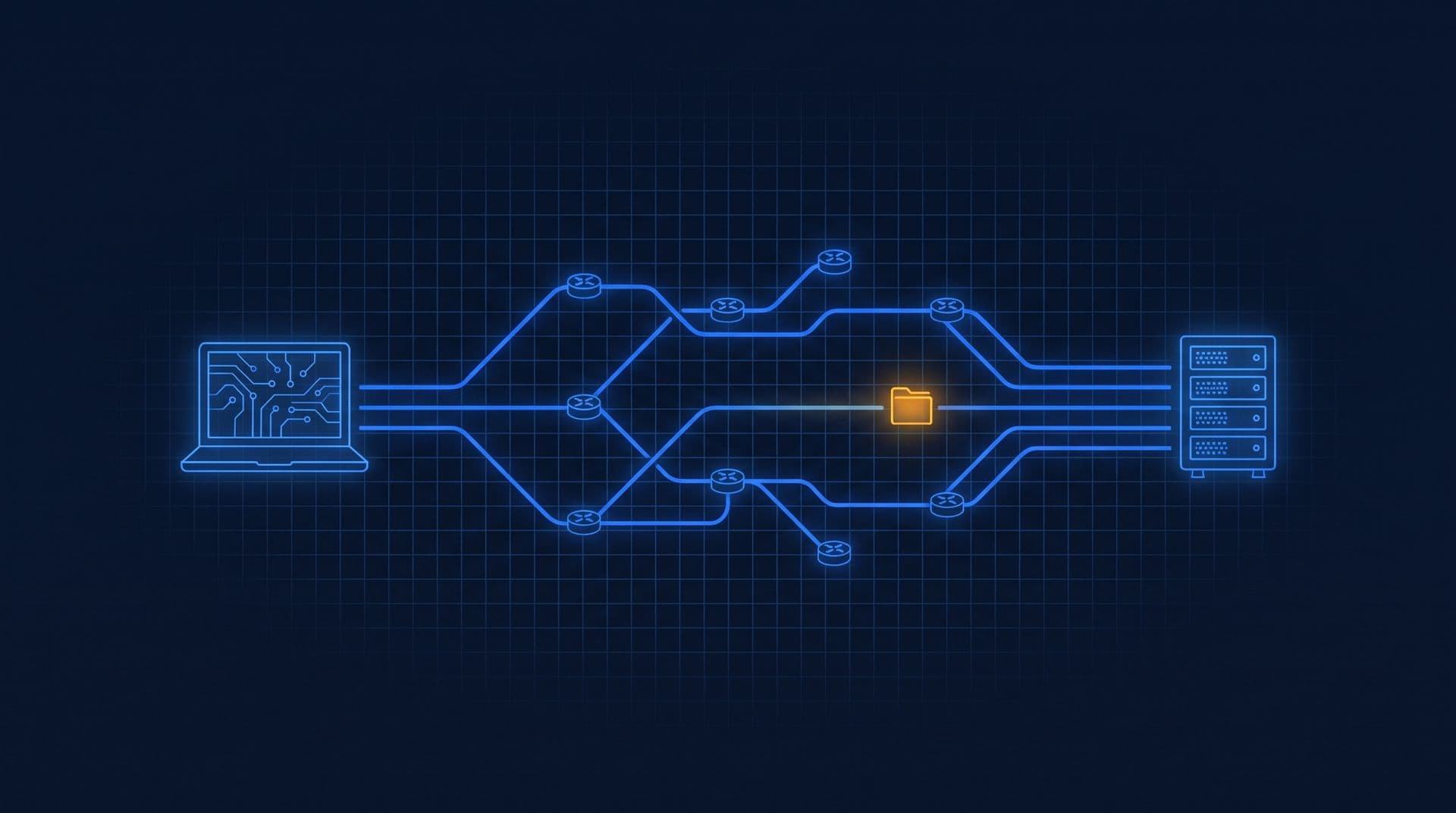
A router is a small computer with several network connections and a table. For each packet it reads the destination address, looks up which of its connections leads closer, and sends the packet out that way. The next router does the same, and the next, maybe ten or fifteen times between the office and a data centre (illustrative). Each of those steps is a hop.
No single router knows the whole route. Each one only knows which way is closer, a bit like asking for directions in a city where everybody knows their own neighbourhood. And because each packet is handled on its own, two packets from the same reply can even take different paths.
Ports
So the packet reaches the right computer. But that computer is running lots of programs at once (Part 6), so which one gets it? The header carries one more number for that, the port, and each program listens on its own. Secure web pages use port 443, and Modbus TCP, from Electricity Part 22, uses port 502. The operating system reads the port and puts the packet into that program's memory. To the program, a network reply is just more numbers that turn up in memory, like the mouse's numbers in Part 8.
How the internet works
Now, things go wrong on the way. A router that's too busy simply drops packets. Radio gets interference. And packets that took different paths can arrive in the wrong order. So how do we get a reliable reply out of unreliable packets?
Well, what if we number them? The sender numbers every byte it sends, and the receiver keeps sending back short notes saying how far it has got, like "got everything up to byte 30,000". If a note doesn't come back in time, the sender sends the missing piece again. Meanwhile the receiver holds early arrivals in memory until the gaps are filled, then hands the program everything in order. These rules are TCP, the Transmission Control Protocol, the same TCP that carried Modbus in Electricity Part 22.
There's one more TCP rule that turns out to matter a lot. TCP doesn't know how fast the path is, so it starts by sending only about ten packets, waits for the notes, then sends about twice as many, then twice that again, speeding up until something drops. That's called slow start, and it means even a short reply takes a few round trips.
So that's basically how the internet works. Bits travel on wires and radio, packets carry their addresses, routers pass them on hop by hop, ports find the right program, and TCP numbers and resends until everything has arrived.
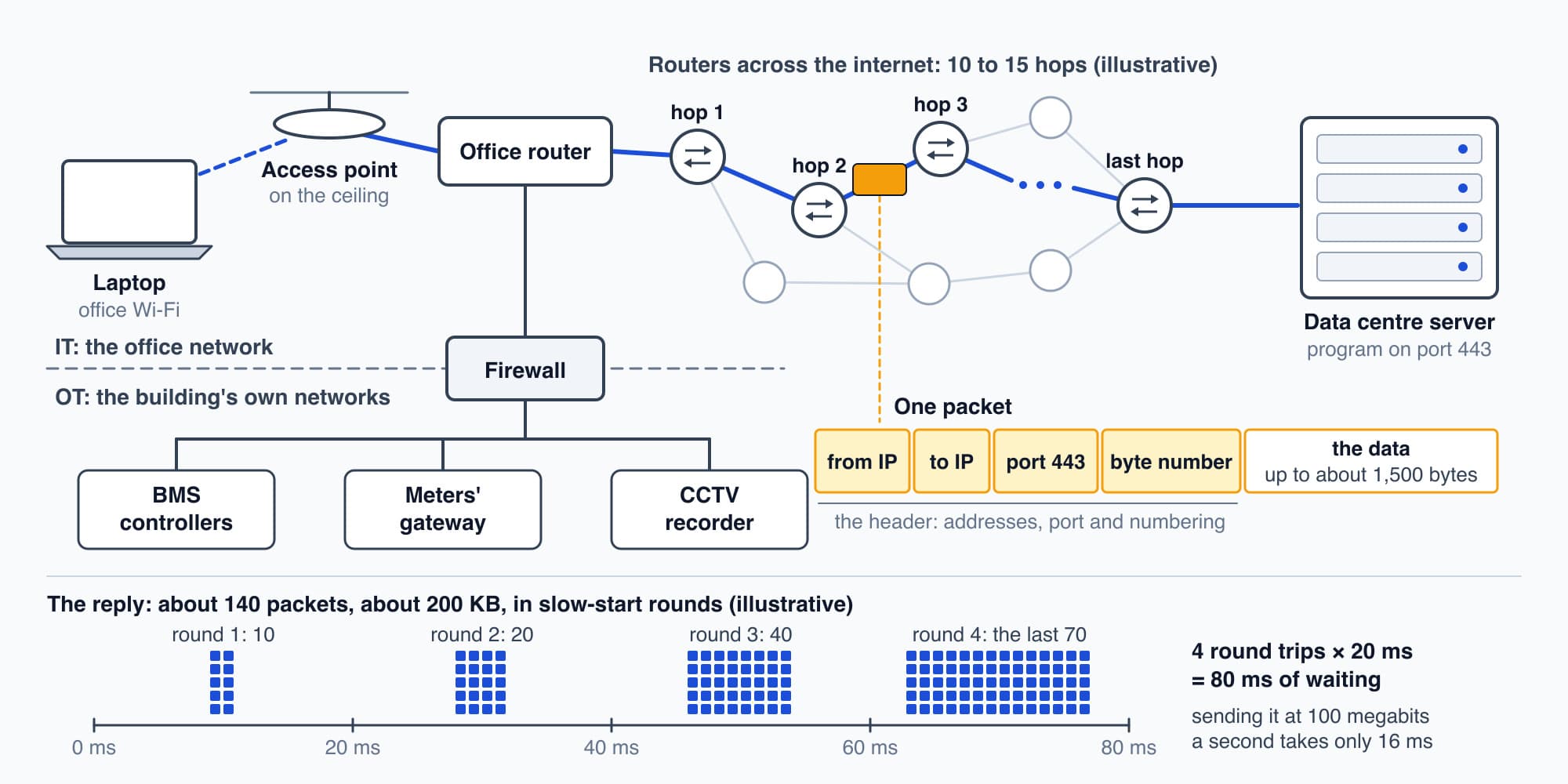
Packets carry their own addresses, routers pass them on, and TCP numbers them and puts them back in order.
A request and a reply
So let's follow one real request, the facility manager's tap. The Open button's code asks the browser for the alert's chart data. The browser already has a secure connection open to the dashboard's server, which it set up when the page loaded, swapping keys so nobody in between can read the readings. It sends a short request of a few hundred bytes, which basically says "CWP-2's power from 8 p.m. to 8 a.m., please".
The request goes out over Wi-Fi to the access point, through the office router, across routers on the internet, to the data centre. A computer there finds the night's 10,000 or so readings and sends them back as text. Each reading with its time is about 16 bytes, so the readings come to about 160 KB, and with the names and punctuation the text puts round each one, the whole reply is about 200 KB (all illustrative). That's roughly 140 packets, each one hopping back, being ticked off and being put back in order on the laptop.
Latency and bandwidth
Now how long does that take? There are two separate numbers here, and I used to mix them up. Bandwidth is how many bits a second the line can carry. Latency is how long a message takes to get there and back, which we call the round trip. Say the office line is 100 megabits a second and the round trip to the data centre is 20 ms (both illustrative).
Pushing 200 KB out at 100 megabits a second takes
$$\frac{200{,}000 \times 8}{100{,}000{,}000} = 0.016 \ \text{s} = 16 \ \text{ms}$$
But that's only the sending. The request has to get there first, and then slow start means the 140 packets come back in rounds of growing size, about 10, then 20, then 40, then the rest, with a round trip for each. That's about four round trips:
$$4 \times 20 \ \text{ms} = 80 \ \text{ms}$$
So the waiting is about 80 ms and the sending about 16 ms. Now let's double the line to 200 megabits a second. The sending drops to 8 ms, but the waiting stays at 80 ms, because a round trip is set by the distance and by the routers on the way, and the line's speed doesn't change either of those. That's why a page can feel slow on a fast line, and for small replies like the chart's, it's the latency that decides how long we wait. (If the browser had to open a new connection first, add about two more round trips.)
The CCTV clip is the other kind of traffic. Here's how the two compare (illustrative):
| The chart | The CCTV clip |
|---|---|---|
What travels | about 200 KB, once | about 2 megabits every second |
From | a data centre, 20 ms away | the security room, inside the building |
What sets the wait | round trips (latency) | the line's speed (bandwidth) |
Share of a 100 megabit line | a burst of about 16 ms | 2%, for as long as it plays |
Try it. Say the dashboard's server were overseas, with a 200 ms round trip instead of 20 ms. Roughly how long would the chart's data take now, on the same 100 megabit line?
Show the worked answer
The sending time doesn't change, because the line is the same, so it's still about 16 ms. But the four round trips now take 4 × 200 ms = 800 ms. So the chart would take about
$$800 + 16 \approx 816 \ \text{ms}$$
That's most of a second, against about 96 ms before. A line ten times faster would barely help, while a server closer to the building would.
Two networks in one building
So far we've treated the network as one big thing. In a real building it's kept in pieces on purpose. The office network carries laptops, phones and email. The building's own networks, which link the building management system (BMS) controllers, the meters' gateway and, very often, the CCTV cameras, are usually kept apart, either as separate networks or as separate sections behind a firewall, a gatekeeper box (often part of a router) that only lets through the traffic it's been told to. People call the two sides IT, for information technology, and OT, for operational technology.
The reason is mostly risk. A laptop opens email attachments and visits websites, and a chiller controller should never meet any of that. A lot of building equipment was also designed long before anyone expected it to be reachable from the internet. Keeping the two sides apart stops one side's traffic from swamping the other, too. OT vs IT networks and who owns the BMS network go into how buildings actually manage it.
The chart and the clip at 8:05
So at 8:05 the laptop makes two very different trips, one for the dashboard's tap and one for the CCTV app's play button. The chart's trip is the one we just followed, out to the data centre and back in about 140 packets. The clip never leaves the building. It comes from the CCTV recorder in the security room, from the security network through the firewall to the office side, as a steady stream of about 2 megabits a second (illustrative). For the chart, the round trips set the wait. For the clip, what matters is the steady flow, every second, for as long as the video plays.
Far too few numbers
And look at how small that stream is. The screen in Part 7 needs 6.2 MB for every frame, so at 30 frames a second, raw video would need
$$6.22 \ \text{MB} \times 30 \approx 187 \ \text{MB a second} \approx 1.5 \ \text{gigabits a second}$$
But the clip arrives at about 2 megabits a second, roughly 750 times smaller. So how can so few numbers make a video? That's Part 11: Video and Sound.
This is Part 10 of 13 in Cobler's How a Computer Works course. Previous: Storage: How a Drive Keeps Files. Next: Video and Sound.
Cobler builds CobiNeural, which carries a building's meter and BMS readings from its gateway to a cloud dashboard like the one in this story. To see your own building's data, request a demo.
FAQ
Frequently asked questions
Ask us about this topic
Something in this article you want to dig into — or a situation in your own building it doesn't quite cover? Send us your question. We don't run public comments; the team replies to you directly by email.