Blog
The Screen: Pixels, Frames and the GPU
How does a list of numbers become a picture? Part 7 opens up a laptop screen: pixels as three bytes, the framebuffer a display controller sweeps 60 times a second, drawing as writing numbers, and why a GPU's thousands of small cores can fill 2 million pixels in time.
 Tan Kok XinHow a Computer Works

Part 7 of 13 in Cobler's How a Computer Works course. New here? Start with the course map.
At 8:05 the CobiNeural dashboard is open on the facility manager's laptop, with the 2 a.m. CWP-2 alert at the top of its list. Now hold a magnifying glass up to that screen (or zoom a phone camera right in), and the smooth letters fall apart into a grid of tiny squares. Look closer still, and each square is three even smaller strips of light, one red, one green and one blue.
In Part 6 we got the dashboard running, but all it had done was change numbers in RAM. So how does a computer screen work, and how do those numbers turn into the picture under the magnifying glass? Well, let's start with one of those little squares.
Pixels
From a normal distance our eyes blend the three strips into one colour. Turn all three up full and we see white. Turn them all off and we see black. Put red and green on full with blue off, and we see yellow. So each little square can show almost any colour by mixing its three lights, and it's the pixel from Part 1 (the word is short for picture element). There we gave it three bytes, one for each strip's brightness from 0 to 255, so the course's amber is still just 245, 158 and 11. The laptop in our story has 1,920 pixels across and 1,080 down, so let's count how many numbers a whole screen needs:
$$1920 \times 1080 = 2{,}073{,}600 \ \text{pixels}$$
$$2{,}073{,}600 \times 3 = 6{,}220{,}800 \ \text{bytes} \approx 6.2 \ \text{MB}$$
So one screenful is about 6.2 million numbers. Now let's put them in a row in memory, starting with the top-left pixel, then the rest of the top row, then the next row down, all the way to the bottom-right. That gives us a block of memory holding the whole picture, and that block is what we call the framebuffer.
How a computer screen works
Now, the screen can't read the processor's mind. Instead, a circuit called the display controller, part of the laptop's graphics chip, reads the framebuffer from the first byte to the last, row by row from the top, and sends the numbers down a cable to the panel. Then it goes back to the top and does it all again, about 60 times a second. We call that the refresh rate, 60 hertz (Hz).
Inside the panel, each number sets the brightness of one strip. On a common LCD (liquid crystal display), a white backlight shines through a thin layer of liquid crystal, which a small voltage turns into a shutter that lets more or less light through, and then through a red, green or blue filter. On an OLED (organic light-emitting diode) screen, each strip makes its own light instead. Either way, a bigger number means more light. So let's see how many numbers the display controller reads every second:
$$6{,}220{,}800 \times 60 \approx 373 \ \text{million numbers a second}$$
And it does that all day, whether the picture changes or not.
Drawing is writing numbers
So this is the part that finally made screens make sense to me. To draw anything at all, a program just writes numbers into the framebuffer, and on its next sweep the display controller sends them out. Remember slot 14 of the toy in Part 5? Writing 50 into it opened the damper to 50%, because that slot was wired to the outside. The framebuffer is the same trick, only six million bytes big, with the display controller reading it out to the panel instead of a wire to a damper. So to the processor, the screen is just more memory.
So where does one particular pixel live? Rows come one after another and each pixel takes 3 bytes, so the pixel at x across and y down starts this far into the framebuffer:
$$\text{offset} = (y \times 1920 + x) \times 3$$
Let's take the pixel at 652 across and 55 down (we'll come back to that exact spot in Part 8):
$$(55 \times 1920 + 652) \times 3 = 106{,}252 \times 3 = 318{,}756$$
So to paint that pixel amber, the program writes 245, 158 and 11 into bytes 318,756, 318,757 and 318,758 of the framebuffer. That's a multiply, an add, another multiply and three stores, and every picture on every screen is that, repeated.
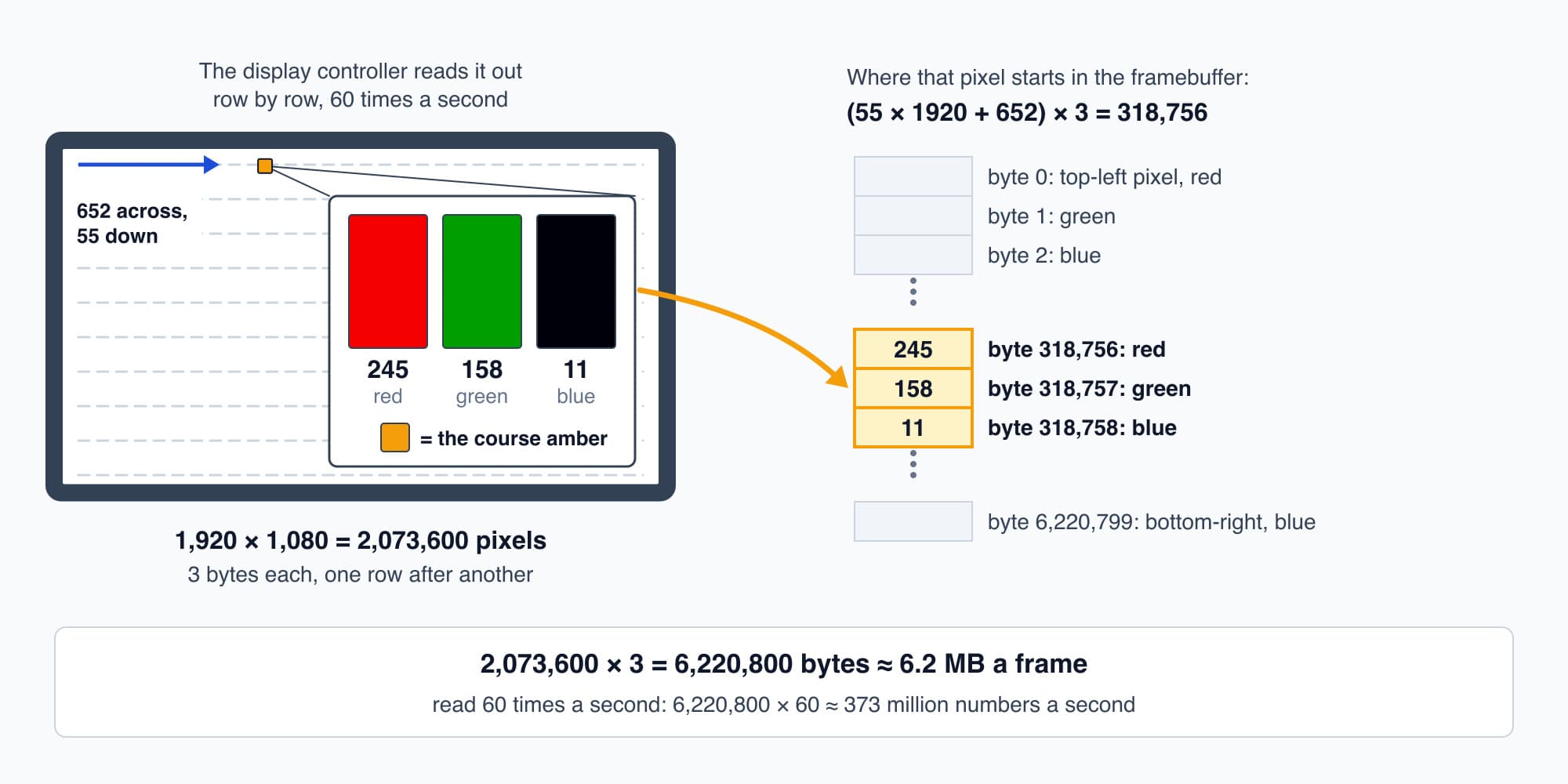
To the processor the screen is memory: three bytes per pixel, read out 60 times a second.
A letter is no different. The dashboard's font stores the outline of every letter, and to write A (number 65, from Part 1), the program looks up A's outline, works out which pixels fall inside it at this size, and writes the text colour into those pixels. Pixels right on the edge get an in-between colour, so the letter looks smooth instead of jagged. The word "Alert" on the dashboard is a few hundred pixels written exactly this way.
There's one catch with drawing straight into the framebuffer. If the display controller sweeps past while a program is halfway through a change, we'd see the top of the new picture and the bottom of the old one. So computers usually draw into a second buffer that isn't on show, and when the new frame is finished, they tell the display controller to read from that one instead, starting at its next sweep. That trick is called double buffering.
Try it. Say the chart's highest point lands at 900 across and 400 down on the screen. At what byte offset does that pixel start in the framebuffer?
Show the worked answer
Using the same rule, offset = (y × 1920 + x) × 3:
$$(400 \times 1920 + 900) \times 3 = 768{,}900 \times 3 = 2{,}306{,}700$$
So its red byte is at 2,306,700, its green at 2,306,701 and its blue at 2,306,702. That's about 37% of the way into the 6.2 MB framebuffer, which makes sense, since 400 rows is about 37% of 1,080.
The GPU
So how much work is drawing? Writing one pixel is a few instructions, but a modern screen rarely just copies colours. For every pixel, the browser has to work out which part of the page covers it, blend see-through layers, and smooth the edges and shadows. Say that's 100 instructions per pixel (illustrative). For one full frame, that's
$$2{,}073{,}600 \times 100 \approx 207 \ \text{million instructions}$$
At 3 billion instructions a second, one core needs about 69 ms for that frame. But at 60 Hz the screen wants a new frame every 16.7 ms (1 ÷ 60 of a second). So one core can't keep up, even before it does anything else.
Now look at what kind of work it is. Each pixel's sums don't depend on its neighbour's, so pixel 318,756 never has to wait for any other pixel to finish. So what if, instead of one fast core doing two million pixels one after another, we had thousands of small, simple cores each doing their own share at the same time?
Well, that's what the graphics processing unit, or GPU, is, and it's the several cores from Part 6 taken about as far as they go. It's a chip, or a part of the laptop's main chip, packed with thousands of small cores. Each one is basically an ALU like the one in Part 3, and they work in groups, all running the same short program on different pixels. Let's take 2,048 cores (illustrative):
$$2{,}073{,}600 \div 2{,}048 \approx 1{,}013 \ \text{pixels each}$$
So each core has about a thousand pixels to work out instead of two million. A GPU core is slower and simpler than a main processor core, but there are so many of them that the whole frame takes only a small part of the 16.7 ms it has.
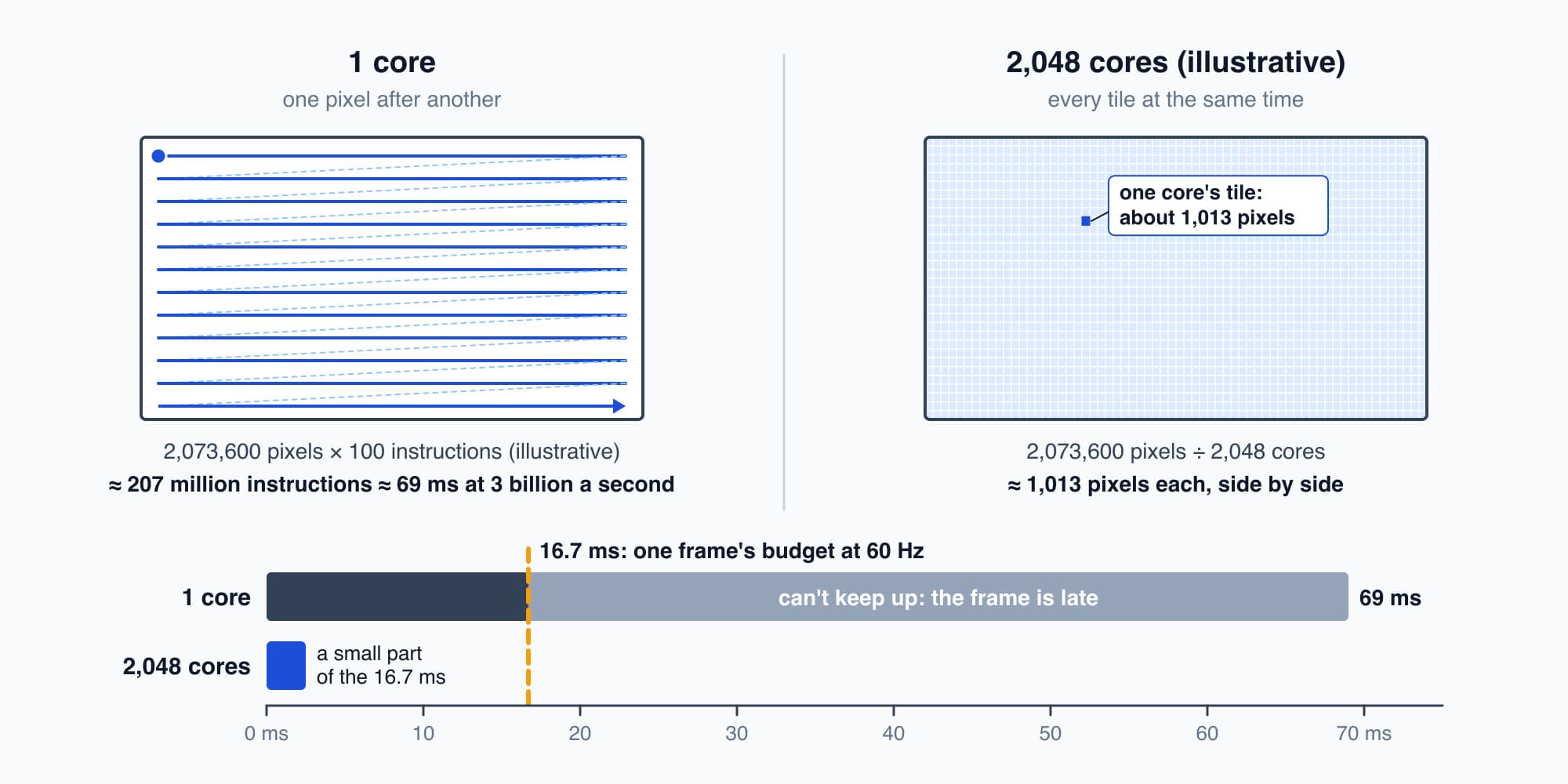
Pixels don't wait on each other, so thousands of small cores can share one frame.
Games and AI
This is why games need a GPU. A game doesn't just show a picture. Every frame, it works out a whole 3D scene from scratch, from the shapes of the objects, where the light falls and where the camera is looking, and turns it into 2 million pixels, 60 or more times a second. That's a vast number of the same small sum, done side by side.
It's also why artificial intelligence (AI) runs on GPUs. Running an AI model is mostly multiplying long lists of numbers together and adding up the results, billions of multiply-adds that don't wait on each other. That's the same shape of work as pixels, so the same kind of chip suits it.
Even our dashboard uses the GPU. The browser hands it the pieces of the page, and the GPU puts them together into each finished frame, which leaves the processor's cores free for the page's own code.
The CWP-2 chart
So let's jump ahead a moment, to just after the facility manager opens the alert, and watch its chart draw itself. The dashboard gets Sunday night's readings for the pump, one every 4.2 seconds from 8 p.m. to 8 a.m., which is about 10,000 numbers (the 4.2 seconds is the meters' polling time from Electricity Part 22; the chart's size is illustrative). Say the chart's plot area is 720 pixels wide and 300 pixels tall, running from 0 kW at the bottom to 30 kW at the top. Twelve hours is 720 minutes, so each minute gets one column of pixels, and the program averages the 14 or so readings in each minute into one point. Each kW is 10 pixels up.
At 2 a.m. CWP-2 started drawing 27 kW with every chiller off, and it kept going until 6 a.m. That's the anomaly from Electricity Part 23. 2 a.m. is six hours into the chart, which is 360 minutes, so it's column 360. And 27 kW is 27 × 10 = 270 pixels above the bottom. The program does that little sum for every minute, then the GPU joins the points into a line, smooths its edges and fills the shading underneath. From column 360 to column 600, the line sits as a flat shelf 270 pixels up. The new frame is swapped in, and on the next sweep the shelf is on the screen.
Something we can see
So now the dashboard can show anything it likes, just by writing numbers. But we skipped a step. Before any chart could draw, the facility manager had to tap the alert, and so far the laptop has no idea where their finger is. So how does the computer know where you tapped? That's Part 8: Clicks and Key Presses.
This is Part 7 of 13 in Cobler's How a Computer Works course. Previous: Programs and the Operating System. Next: Clicks and Key Presses.
Cobler builds CobiNeural, which turns a building's meter and sensor readings into live charts like this one. To see your own building's numbers, request a demo.
FAQ
Frequently asked questions
Ask us about this topic
Something in this article you want to dig into — or a situation in your own building it doesn't quite cover? Send us your question. We don't run public comments; the team replies to you directly by email.