Blog
What Is a Building Management System (BMS)? A Plain-Language Start
A BMS is a building's central nervous system: it senses conditions, decides against a target, and acts to run HVAC, lighting and pumps from one screen.
 Tan Kok XinBuilding Automation & BMS Fundamentals
Part 1 of 16 in Cobler's Building Automation and BMS Fundamentals course. New here? See the course page.
Walk into a large air-conditioned office in Kuala Lumpur at 2pm and the lobby, the lifts and the meeting rooms all feel cool. Somewhere below, chillers are making cold water, pumps are sending it up the building, and fans are pushing cooled air through the ceilings. Nobody is standing at a panel turning knobs. So what adjusts all of this, minute by minute, as the sun moves and people come and go?
In most large buildings the answer is a building management system, or BMS. This part explains what a BMS is, what it does and what it does not do.
This is the first of 16 parts in Cobler's Building Automation and BMS Fundamentals course. It is written for facility managers, building owners, technicians and anyone else who works alongside a BMS without being a controls engineer. You do not need any background in engineering. The course starts with how a BMS thinks, moves on to how it runs a building day to day, how it is connected and looked after, and how it runs the chiller plant and air side, and ends with how to prove it works.
Throughout the course we follow one machine in our example office tower, a fictional 20-storey office tower in Kuala Lumpur that we will use in every part. The machine is AHU-12A, the air handling unit that cools the east half of level 12. Each part adds a little more to how the BMS runs it.
What is a building management system?
A building management system is a network of small computers, called controllers, plus software, that monitors and controls a building's mechanical and electrical services. Monitoring means it reads what the equipment is doing. Controlling means it can change what the equipment does.
In practice a BMS looks after:
- Air-conditioning and ventilation. This is the largest job. It includes the chillers that make chilled water, the pumps that move it, the cooling towers that reject heat, and the units that cool and move air: air handling units (AHUs), large fan-and-coil boxes serving a whole area, and fan coil units (FCUs), smaller units serving one room or zone. You will also see the term HVAC (heating, ventilation and air-conditioning). Malaysia has no heating season, so here it means cooling and ventilation. If these machines are new to you, AHU vs FCU and the Cooling Fundamentals course explain how they work.
- Lighting. A BMS may also switch common-area and car park lighting on a schedule. This course stays with air-conditioning, which is where most of the work is.
- Metering. It can read electricity, water and chilled water meters so that use is visible in one place.
- Status from fire and security systems. A BMS usually shows the status of the fire alarm and access control systems, such as "fire panel healthy" or "door forced", but does not command them.
A BMS is not one box. It is many small controllers placed in plant rooms and on each floor, connected by a network, and shown to an operator as graphics on a screen. Part 3 explains how those controllers are arranged.
A BMS works in a loop: sense, decide, act
Whatever the brand, a BMS does the same three things again and again, for every piece of equipment it controls.
Here is how it works on AHU-12A:
- Sense. A temperature sensor in the return air duct measures the air coming back from the level 12 offices. It reads 25 °C.
- Decide. A controller compares that reading with the target temperature, called the setpoint. The setpoint is 24 °C, so the air is 1 °C too warm.
- Act. The controller tells a small motorised device on the chilled water valve, called an actuator, to open the valve a little wider. More chilled water flows through the AHU's cooling coil, so the air leaving the coil is colder.
A moment later the sensor reads again, the controller compares again, and the actuator adjusts again. The loop runs continuously, with nobody watching. A BMS in a large building runs thousands of these loops side by side.
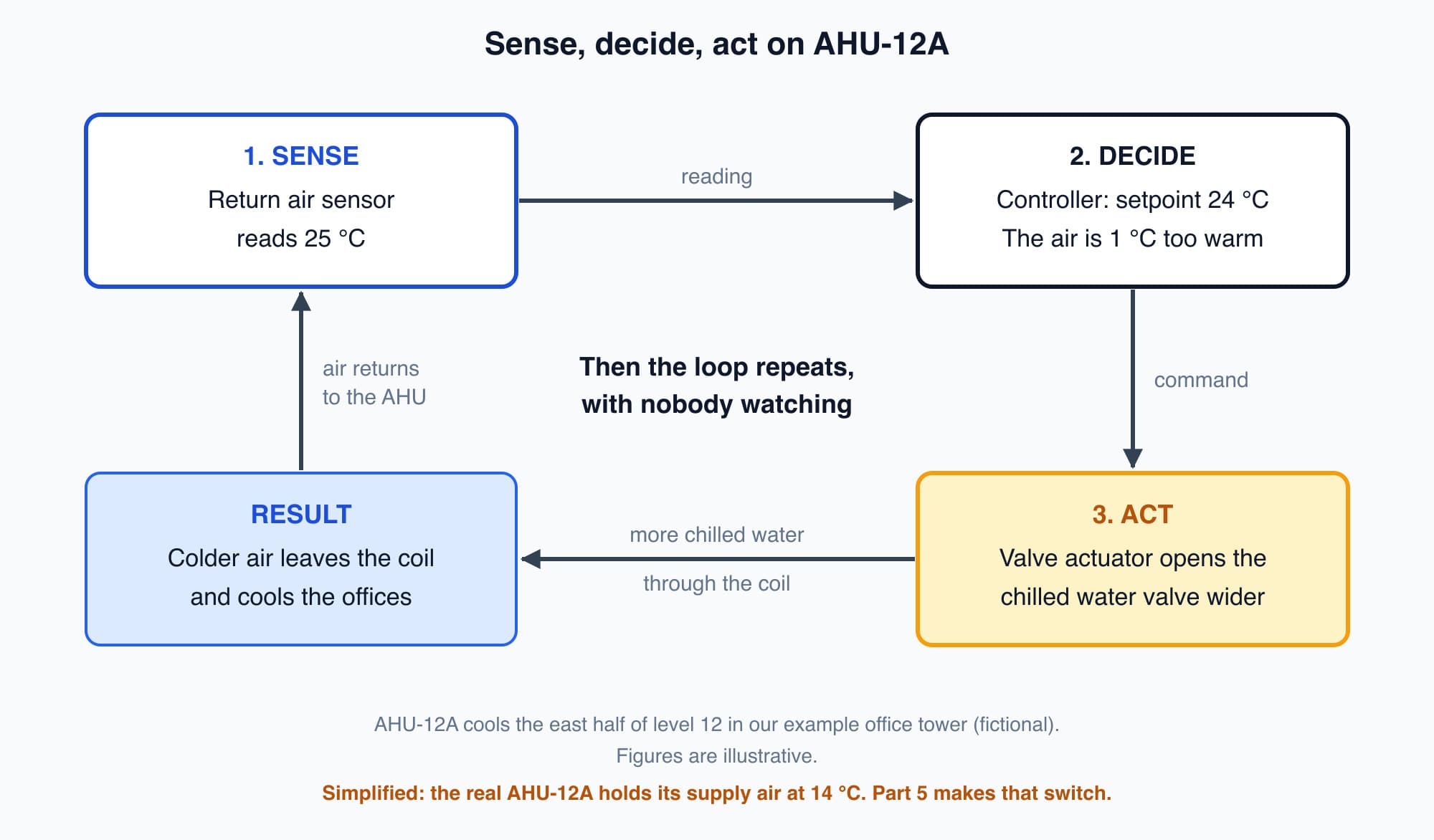
The sense, decide, act loop on AHU-12A: the controller keeps adjusting the chilled water valve until the return air matches the 24 °C setpoint.
(To keep the first example simple, the valve here holds the return air at 24 °C. The real AHU-12A works slightly differently: its valve holds the air leaving the coil, the supply air, at 14 °C, and variable air volume (VAV) boxes hold each room at 24 °C. Part 5 makes that switch, and Part 13 shows how the AHU and the VAV boxes share the job.)
The actuator in the "act" step is a small device that moves a valve. It is not the fan or pump motor that does the heavy work, and Part 2 explains the difference.
Deciding how much to open the valve, without overshooting the target, is its own subject. Part 4 explains the control loop properly and Part 5 explains how controllers judge how hard to act.
A BMS acts: that makes it different from a thermostat or a dashboard
Two common ideas of a BMS are close but not quite right.
A BMS is more than a thermostat. A wall thermostat controls one loop for one room. A BMS runs hundreds of loops across a building and coordinates them with each other. It can decide which chillers run, in what order the pumps start, and which equipment to slow down when demand is high. A standalone thermostat cannot make those decisions.
A BMS is also more than a dashboard. A screen that only shows numbers is a monitoring system. The defining feature of a BMS is the "act" step: it changes what the equipment does. A system that measures but never commands is a different kind of system, and the final part of this course, Part 16, looks at where the line sits. For now, keep one line in mind: a BMS controls; a monitoring system measures.
BMS, BAS, EMS and SCADA: what the names mean
Specifications and vendor brochures use several similar names.
BMS and BAS mean essentially the same thing. "Building automation system" (BAS) is more common in North America. "Building management system" is more common in Britain and in Malaysia. Some people use BMS for a slightly broader system that includes energy and metering, and BAS for HVAC and lighting control only, but in daily use the two names are interchangeable.
The difference that matters is control versus measurement:
- A BMS or BAS controls equipment. It closes the loop and changes things.
- An EMS (energy management system) or analytics platform usually measures and analyses. It meters energy, compares it with benchmarks and flags waste, but it does not command the chillers.
SCADA (supervisory control and data acquisition) comes from industry. It supervises processes in factories, power stations, water treatment plants and pipelines. SCADA and a BMS are built from the same kinds of parts (sensors, controllers and a supervisory screen). A BMS is set up for the comfort, air quality and energy use of an occupied building; SCADA is set up for an industrial process.
For a side-by-side comparison of all four, see BMS vs EMS vs SCADA vs BAS: what's the difference?. (Cobler works on both sides of the control-versus-measurement line: our Automation Services team designs and commissions BMS control, while CobiNeural, named at the end of this page, measures and does not control.)
Why a building needs one
Picture a building where every air-conditioner is a separate unit with its own wall thermostat, not connected to anything else. Nobody can see the whole building at once, and nothing is coordinated. If a fan belt snaps at midnight, nobody knows until people complain the next morning.
A BMS gives the building:
- Central visibility. Staff can see every plant room and floor from one screen instead of walking the building.
- Automatic response to changing loads. When a meeting room fills up or the afternoon sun reaches one side of the building, the BMS responds without anyone asking.
- Fault alarms. A failed pump or a sensor reading outside its normal range raises an alarm straight away, so problems are found early.
- Scheduling. Plant starts before people arrive and eases off when the building empties. In a cooling-only climate, easing off means letting the temperature setpoint rise in empty areas, and starting cooling early enough that the offices are comfortable when people arrive. Part 7 covers scheduling.
- Lower energy cost. Equipment that is coordinated, scheduled and run only as hard as needed uses less electricity than equipment left running at full output. Larger buildings on a Medium Voltage (MV) tariff, such as our example office tower on MV General, also pay each month for their highest 30-minute demand in kilowatts. A BMS can help keep that peak down; Part 14 covers how.
In Malaysia, a BMS is mostly managing cooling
Malaysia has no space-heating season, so air-conditioning runs all year. It is also usually the largest single use of electricity in an office building: commonly around half or more of the total. In the office tower, the chiller plant alone uses about 35% of the building's electricity, before counting the AHU fans.
This means a large share of the building's electricity passes through equipment that the BMS controls. A better cooling strategy changes the biggest number on the electricity bill. (If the difference between power in kW and energy in kWh on that bill is unclear, the Electricity course explains it in kW versus kWh.)
So although a BMS can manage lighting, metering and more, in a tropical building most of its work is producing and distributing cool air without waste. That is why much of this course is about AHUs and the chilled water plant.
Worth knowing: A BMS usually shows the fire alarm and access control status but does not command those systems. They are kept separate on purpose, so that a BMS fault cannot affect them. Part 6 shows how the fire alarm panel stops AHU-12A's fan through its own wiring, even if the BMS is switched off.
What comes next: the BMS's sensors and actuators
The sense, decide, act loop has three parts. The "sense" part needs sensors, and the "act" part needs actuators. The next part, BMS Sensors and Actuators, looks at both: what AHU-12A measures, what it can move, and why the small actuator on a valve is not the same thing as the motor that drives a fan. It starts from one question: a BMS is only software on small computers, so how does it measure the building, and how does it move anything?
Check your understanding
- In the AHU-12A example, which device senses, which decides and which acts? The return air temperature sensor senses (it reads 25 °C). The controller decides (it compares 25 °C with the 24 °C setpoint and finds the air too warm). The valve actuator acts (it opens the chilled water valve wider so the coil cools the air more).
- A screen shows the temperature of every floor but cannot change anything. Is it a BMS? No. It is a monitoring system. A BMS both measures and controls: its defining step is acting on the equipment.
Recap: A building management system is a network of controllers and software that monitors and controls a building's services, mainly air-conditioning and ventilation, plus lighting schedules and metering; it only displays fire and security status. It works in a continuous loop: sense, decide, act. It is more than a thermostat because it coordinates many loops, and more than a dashboard because it controls equipment. BMS and BAS mean the same thing, an EMS measures rather than controls, and SCADA is the industrial equivalent. In Malaysia, cooling is usually around half or more of a building's electricity, so a BMS is mainly a system for running cooling well.
Go deeper on video (optional)
This short video walks through the same sense, decide, act idea with different equipment. It is optional: you do not need it for the next part.
RealPars walks through what a building management system is and how it senses, decides, and controls a building's HVAC, lighting and pumps in plain terms.
This is Part 1 of 16 in Cobler's Building Automation and BMS Fundamentals course. Next: BMS Sensors and Actuators: A Building's Senses and Muscles.
Cobler builds CobiNeural, a platform that shows a facility team its building's energy, water and indoor air data as live numbers across the whole site. To see how your building performs, talk to us.
FAQ
Frequently asked questions
Ask us about this topic
Something in this article you want to dig into — or a situation in your own building it doesn't quite cover? Send us your question. We don't run public comments; the team replies to you directly by email.